

2025-Group 13

Team 13 members

Final Gutterball Breakout
Gutterball Breakout - Single Player Haptic BrickBreaker
Project team member(s): Alex Qiu, Jeyan Kirtay, Sunny Leung, Cadence Boronkay
Our project reimagined the classic arcade game BrickBreaker by adding haptic feedback to enhance immersion and gameplay. Inspired by prior work in haptic Pong systems, the goal was to create a one-degree-of-freedom interface combining vibrotactile and kinesthetic feedback. We implemented a custom Hoeken-based four-bar linkage, integrated with a joystick-style handle and arcade-style chassis. The game was developed in Processing and synced with the Hapkit to provide force and vibration cues during play. At the open house, users found the game fun and intuitive, with positive feedback on the physical design, despite minor issues with damping and linkage durability.
On this page... (hide)
Introduction
This project explores human-computer interaction by integrating haptic feedback into a classic arcade game, BrickBreaker. The game provides an engaging platform to apply key ME 327 concepts such as real-time simulation, dynamic system modeling, and haptic rendering. To deliver tactile interaction, we used a linkage mechanism with a Hoeken straight line linkage mechanism to generate smooth, linear motion of the handle, enabling more natural and responsive user input. By incorporating haptic effects like ball impacts, the device transforms the game into a multi-sensory experience. Users physically feel system dynamics through damping and vibrations, reinforcing abstract concepts through embodied interaction. Overall, this project effectively supports the course’s educational objectives by combining mechanical design, control systems, and user-centered interaction in a fun and intuitive application.
Background
Integrating haptics into traditional arcade and video games has been an active area of research for decades, with numerous efforts aimed at enhancing user immersion and accessibility through tactile feedback. One of the most common forms of haptic feedback in commercial gaming is vibrotactile feedback, which is now standard in handheld devices like smartphones and game controllers. This foundational concept has been expanded upon significantly in research environments, especially with classic games such as Pong. For example, Nordvall and Boström introduced Sightlence, a haptic-only version of Pong designed for accessibility applications. Their system used vibrotactile feedback to convey positional information of the ball relative to the player’s paddle, enabling gameplay solely through the sense of touch. This work highlights how haptic feedback can replace or augment visual cues, making games more inclusive.
Building upon the idea of immersive haptics, Morris, Joshi, and Salisbury developed a multiplayer haptic Pong game using two SensAble PHANToM devices. Their system allowed players to interact in a 3D virtual space with six degrees of freedom (DoF), incorporating realistic physical behaviors such as collisions through a mass-spring-damper model. This work demonstrated how complex kinesthetic feedback could deepen player engagement by simulating the dynamics of real-world interactions. Similarly, Strachan et al. proposed a novel haptic interface tailored for visually impaired users. Their system used probabilistic feedback generated by a particle filter to predict the ball’s motion, with a custom vibrotactile mouse delivering localized fingertip deformations mimicking friction-based textures to signal proximity and impacts. These studies collectively illustrate the versatility of haptic feedback—from vibrotactile to kinesthetic—and its potential in gaming across different user populations and levels of complexity.
Inspired by the depth of work in haptic Pong, we applied similar haptic interaction principles to Brick Breaker, another classic arcade game. While Pong research often explores multi-DoF spatial interfaces, our game focuses on 1-DoF linear motion. To implement this, we referenced the work of Bayle et al., who studied a class of one degree-of-freedom mechanisms to design linear haptic interfaces. Their research evaluated approximate straight-line mechanisms, such as the Hoeken linkage, for their suitability in haptic applications. The Hoeken mechanism was found to offer a good compromise between mechanical simplicity and the ability to produce near-linear motion, making it a suitable choice for our application. Drawing from this and prior literature, our system combines vibrotactile effects (e.g., collisions and wall boundaries) with kinesthetic feedback via the Hoeken mechanism to simulate ball bounces, paddle resistance, and boundary collisions. Our haptic Brick Breaker game builds upon prior work not only by adapting existing tactile paradigms to a new arcade format, but also by refining the mechanical and perceptual interface for a simplified 1-DoF control, making haptic gameplay more accessible and intuitive.
Methods
Materials
- 1/8" Duron sheets
- DC motor, D-shaft, and capstan wire (repurposed from Hapkit)
- Hapkit board
- Laser-cut acrylic boards (x2, custom mounting panels)
- 3D printed PLA parts: 4-bar linkage, arcade handle (ball + rod)
- Vibration ERM motors (x3)
- Wiring and power cables
- Spacers, washers, and nuts
- Computer (for game display and control)
Hardware Design and Implementation
Four-Bar Linkage:
To achieve approximately linear 1-DoF motion, we modeled the mechanism after the Hoeken four-bar linkage, as recommended in Bayle et al.'s evaluation of straight-line haptic mechanisms. One of the linkages was adapted to integrate with a capstan drive system, mimicking the ME 327 Hapkit setup. The motor and D-shaft are mounted in adjustable laser-cut slots to minimize the capstan wire length and maintain tension.
Components were fabricated using PLA for the 3D printed links and laser-cut acrylic for the base plates. Washers were added to selected joints to reduce lateral play due to printing tolerances. An end stop was incorporated into the design to prevent the linkage from entering a near-singularity straight-line configuration, which would otherwise cause mechanical jamming or reduced control authority.


Handle:
The handle was inspired by a traditional arcade joystick and serves as the main user interface. It consists of a 3D printed PLA ball and rod. The rod is press-fit into the ball and screws directly into the linkage's terminal link.
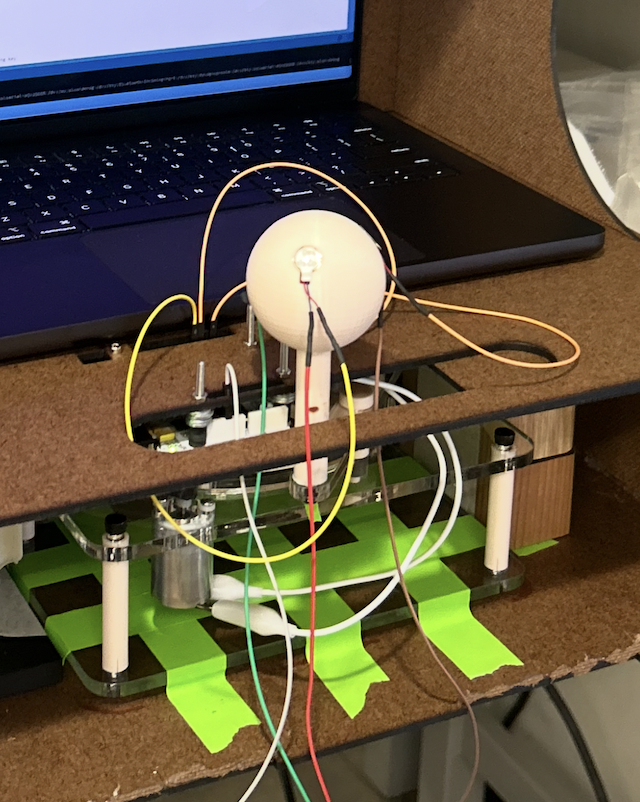
To provide vibrotactile feedback when the paddle hits a ball or wall in the game, three ERM motors were embedded into the joystick ball. Cutouts were integrated into the ball design (see left-most figure below) to seat the motors securely, and internal routing channels were designed to guide motor wires out through the handle's base (see middle figure below). The wiring connects to the Hapkit board for coordinated feedback control.


Chassis:
The supporting chassis was designed to house the four-bar mechanism, handle, and electronics, and to provide structural support for the game display. It was fabricated from laser-cut 1/8" Duron and assembled using hot glue.
The handle was fitted through a slot in the top platform panel, allowing it to slide linearly during gameplay. The Hapkit motor was attached to the same panel, positioned such that its MR sensor aligned with the D-shaft for real-time tracking of the handle's position. This setup also enabled the motor to output haptic feedback based on in-game events, such as paddle-ball collisions or wall interactions. Removable access panels—including the front decorative panel and the rear monitor mount—allowed for quick and convenient access to internal components for debugging and maintenance.


System Analysis and Control
Electronics:
The electronics package was kept relatively simple and centered around the Hapkit board, which was used to power and control all motors in the system: one DC motor (for kinesthetic feedback) and three ERM vibration motors (for vibrotactile feedback). All motors were driven using PWM signals generated through the Arduino IDE. The Hapkit board connected to the computer via USB and communicated using serial protocols.

The vibration motors were embedded in the joystick handle and wired back to the Hapkit board. The DC motor, mounted to the chassis, provided linear damping effects during gameplay. All wiring was routed through the chassis to ensure stability and avoid interference during user interaction. Additionally, the Hapkit motor was mounted to the upper board of the chassis, so that it could be directly suspended over the magnet + motor shaft, while still remaining concealed within the chassis.


Software Design + Analysis:
The goal of our game is for the player to guide a bottom sliding bar that bounces a ball into rectangular bricks until all bricks have been destroyed in the window. An example of what the game GUI looks like is shown below:


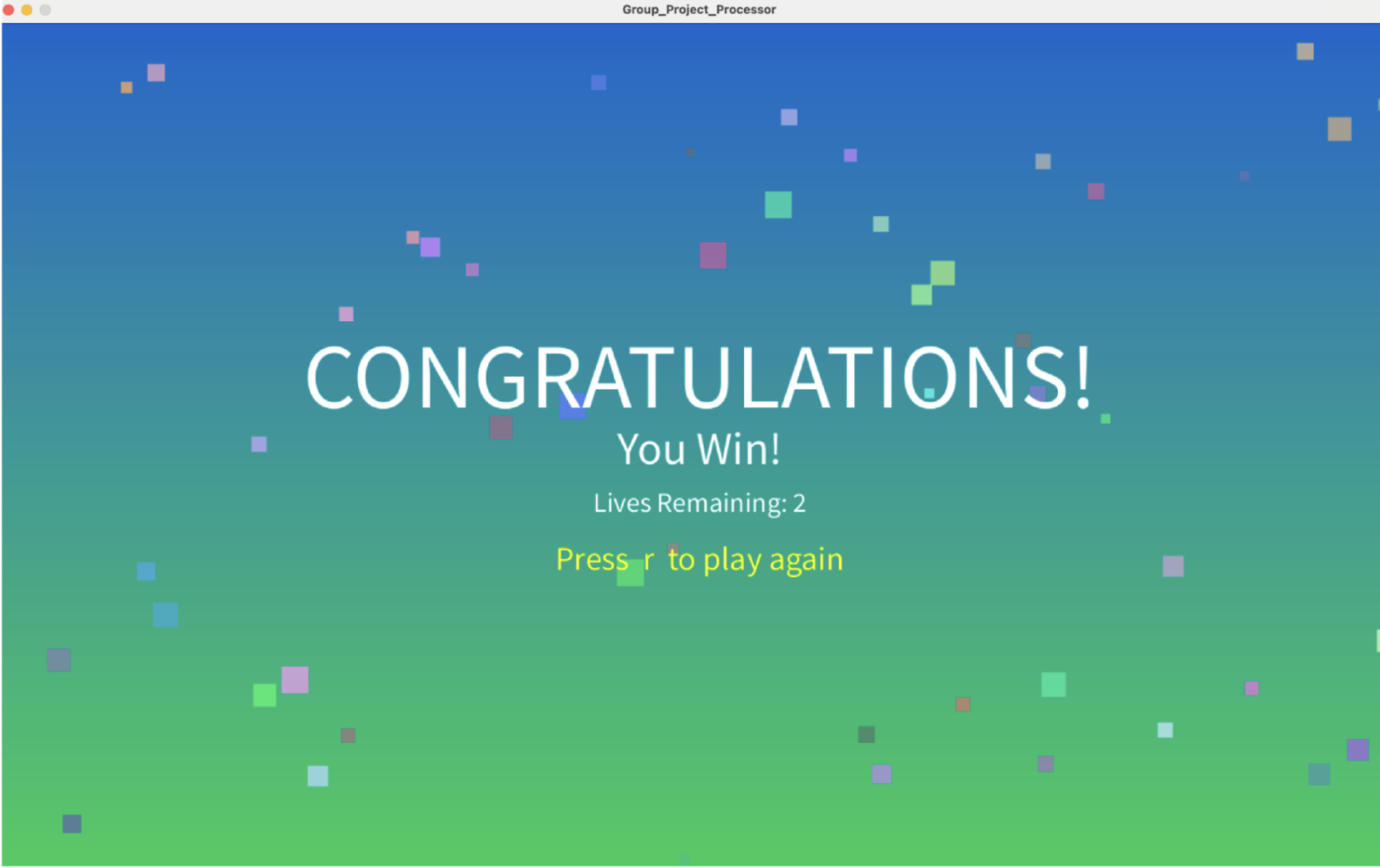

Each brick is attributed to either the default or water zone. In the default zone, the ball and the paddle move at normal speed. When the ball hits a blue water brick, the background color changes and the ball slows down, with the paddle also slowing down.
Whenever the ball hits the paddle, a vibration signal is sent to all the vibration motors in Arduino IDE and triggers haptic vibration feedback in the handle that the player is holding in their hand. The handle also has linear damping when the water zone is activated. This damping is powered by the DC motor, which resists the direction of motion to mimic damping. The player has a total of three lives before the game is over (the player loses a life if the ball hits the bottom floor).
The game GUI is programmed using Processing and interacts with Arduino IDE. The Arduino IDE constantly outputs the handle position as well as reads messages sent from Processing for specific events such as ball collision and linear damping.
Below is the theory + calculations used to determine the Hoeken linkage kinematics and the handle position from magnetic sensor:


Demonstration / Application
Below is a video of the game in action, with both linear damping and vibration motors functioning:

Results
During the open house, the haptic BrickBreaker game received enthusiastic feedback from users. Many found the game intuitive and fun to play, with several commenting that the arcade-style chassis and joystick-style handle made the experience feel authentic and immersive—comparable to playing on a traditional arcade machine. The physical design contributed significantly to the overall engagement and enjoyment.
That said, a few limitations emerged during the demo. Most notably, the linear damping effect did not function as intended, resulting in a mismatch between the visual behavior of the paddle and the physical resistance experienced by the user. This occasionally disrupted the immersive experience, particularly in the water zone where synchronized visual and haptic feedback is crucial.
From a design standpoint, the project successfully implemented a novel 1-DOF haptic mechanism. By adapting elements of the Hapkit and incorporating design principles from Bayle et al.’s work on approximate straight-line mechanisms, we created a custom Hoeken-based four-bar linkage that achieved smooth, near-linear motion. This linkage supported both kinesthetic and vibrotactile effects and served as the foundation for intuitive user control.
Over the course of repeated use, however, the linkage components—primarily fabricated from 3D printed PLA—began to loosen and partially come apart. This wear emphasized the need for a more mechanically robust design in future iterations, particularly if the system is to be used extensively or in public-facing environments.
Future Work
The BrickBreaker game can be evaluated by comparing its haptic water-zone effects against real-world water damping behavior to assess how closely the system replicates realistic motion resistance. Experimental testing could involve measuring user performance and perception during water-zone transitions versus baseline gameplay. The system can also be improved by incorporating a wider variety of haptic sensations, such as physical bumps along the paddle’s path, spring-based constraints to simulate elastic boundaries, or additional zone-based effects that enrich the tactile feedback. Addressing latency in the Processing environment would further enhance the user experience by improving the synchronization between visual display and haptic response, enabling more precise control and immersion. This platform has potential applications beyond BrickBreaker. The core haptic mechanism—centered on a linear linkage with vibrotactile and kinesthetic feedback—could be adapted to a wide range of arcade-style or training games. As VR and AR platforms continue to grow, systems like this one offer a low-cost, adaptable approach to integrating physical feedback into digital environments, making virtual experiences feel more lifelike and interactive.
Acknowledgments
We would like to thank Professor Allison Okamura and the ME327 teaching assistants, for their guidance and assistance throughout this quarter!
Files
Code and drawings should be linked here. You should be able to upload these using the Attach command. If you aren't willing to share these data on a public site, please discuss with the instructor. Also, in this section include a link to a file with a list of major components and their approximate costs.
Chassis Assembly: Attach:ChassisAssembly.zip
Four Bar Linkage Assembly: Attach:FourBarLinkage.zip
Arduino Code: Attach:FinalArduinoCode.zip
Processing Code: Attach:FinalProcessingCode.zip
Bill of Materials: https://docs.google.com/spreadsheets/d/1w0cLC_E8L_b5Rq4XlphT6vj8G1v2SUdXSbwYt7KJu78/edit?usp=sharing
References
[1] Nordvall, M., & Boström, E. (2016). Sightlence: A haptic pong game for the visually impaired. In Proceedings of the International Conference on Human Haptic Sensing and Touch Enabled Computer Applications.
[2] Morris, D., Joshi, N., & Salisbury, K. (2004). Haptic Battle Pong: High-degree-of-freedom haptics in a multiplayer gaming environment. Proceedings of the 12th International Symposium on Haptic Interfaces for Virtual Environment and Teleoperator Systems.
[3] Strachan, S., Wiertlewski, M., Zophoniasson, H., & Anastassova, M. (2018). Probabilistic haptic feedback for arcade gaming accessibility. IEEE Transactions on Haptics.
[4] Bayle, B., Gangloff, J., & Rump, R. (2010). Design of a linear haptic display based on approximate straight line mechanisms. In 2010 IEEE/RSJ International Conference on Intelligent Robots and Systems (pp. 5048–5053). IEEE.
Appendix: Project Checkpoints
Checkpoint 1
For our first checkpoint, we chose goals that would be relatively achievable given feedback from Allison on our proposal. These goals included:
Finalize the conceptual design of the game, both in regard to the graphic and physical components Finalize the materials list
Our initial concept was too simplistic relative to the capabilities we hoped to showcase in the final project. Based on feedback, we decided to significantly enhance the design by replacing the basic Hapkit arm with a more mechanically complex four-bar linkage system. We opted to use a Hoeken straight line mechanism due to that particular mechanism having previously shown to have high linearity with minimal deviation at the tip [1]. This is necessary to ensure that the user will be able to experience the rigid linear haptic experience of moving the paddle back and forth during gameplay. We also added zones with varying haptic feedback to create a more immersive user experience. Conceptual Design Overview Physical Components The updated mechanical system centers on a four-bar linkage, actuated by a motor and controlled via a Hapkit board. This linkage is connected to a joystick-style handle, which the user manipulates to control the in-game paddle. The handle is modeled after those found in traditional arcade cabinets to provide the user with an intuitive and nostalgic user interface. To deliver layered haptic feedback, we are integrating two vibration motors into the handle. These will activate under specific conditions, such as when the paddle contacts the ball or when the ball hits a wall. In addition to vibrotactile cues, force feedback will be generated by the main motor, which modulates resistance based on the ball's position within the game space. For instance, the user will feel more resistance when the paddle is in a "high-stakes" area such as near the bottom wall, mimicking physical tension. To enclose the mechanism and provide a polished, arcade-like aesthetic, we will build a custom acrylic housing around the linkage and base.


Graphical Components The game will follow a brick-breaker-style format, where the user must continuously redirect a bouncing ball to prevent it from falling. The paddle is used to aim the ball at the top wall, which will eventually include breakable targets or obstacles. The game will be displayed on a computer screen and synced with the physical input device in real time.
Materials List
The components that will up our final project include:
- Hapkit board (x1)
- Computer (for game logic and graphical display)
- Joystick handle (3D printed)
- Four-bar-linkage (cut from acrylic)
- DC Motor
- Vibration motor (x2)
- Power supply
- Wiring & connectors
- Fastening & mounting hardware
- Acrylic sheets (for enclosure)
- LEDs
- LED Strips
Checkpoint 2
Joystick-Style Handle
The joystick handle was designed using Onshape and was designed with the idea of embedding three vibration motors in it. Each of these vibration motors corresponds to a specific region of the virtual “paddle” such that when the ball interacts with a region, a specific motor will be activated. This provides varying haptic feedback to the user. Additionally, the wiring is fed through the handle so as not to interfere with the movement/interface with the four bar linkage. The image below is the ball portion of the handle - the cut outs will hold each vibration motor.

Electronics Schematic
The vibration motors will be connected to 3 of the PWM pins on the Hapkit that will vibrate when the ball hits certain sections of the pong paddle. The DC motor will be connected to the positive and negative terminals of the motor driver featured in the Hapkit that will be used to simulate haptic feedback as the motor enters through the different stiffness/damping zones during the game.

Graphic Environment
The goal of our game is for the player to guide a bottom sliding bar that bounces a ball into rectangular bricks until all bricks have been destroyed in the window. An example of what the game GUI looks like is shown below:
The screen is split into two zones, where each zone applies a speed factor to the ball and sliding bar. Each green brick has an associated zone speed factor that is applied to the game. As the ball hits the bar, depending on the contact location, the corresponding vibration motor will provide haptic feedback to the user. The player also will feel linear damping in speed of the handle when different zones are in play (this is powered by the dc motor in the hapkit). The player has a total of three lives before the game is over (the player loses a life if the ball hits the bottom floor).
The game GUI is programmed using Processing and interacts with Arduino IDE. The Arduino IDE constantly outputs the handle position as well as reads messages sent from Processing for specific events such as ball collision and linear damping.
Chassis
The chassis was designed to not only hold and house the four bar linkage, but also the computer which the graphics/game will be displayed on. The handle will be fitted through the slot shown on the platform panel and can be slid back and forth during the game. The components of the chassis will be fitted to create the final form seen below, and each piece will be laser cut out of black and clear acrylic. This will give our final product more of a game-like feel which could ultimately contribute to the users experience with the product and haptic interface.

Four-Bar-Linkage
The Hoeken’s mechanism linkage was resized to allow for a larger linear section of the handle’s stroke. A mounting base was also designed with spacers to allow for prototyping and integration into the chassis.
The top view diagram below shows the labeled linkages and their measurements are below: L1 = 32 mm L2 = L3 = 80 mm L4 = 64 mm

Three dimensional view of linkage design:
