2025-Group 14

Head-mounted Haptic Feedback Device for Interactive Video Game
Project team member(s): Clive Chung, Kyeongwon Park, Jihyeon Kim, Seongheon Hong
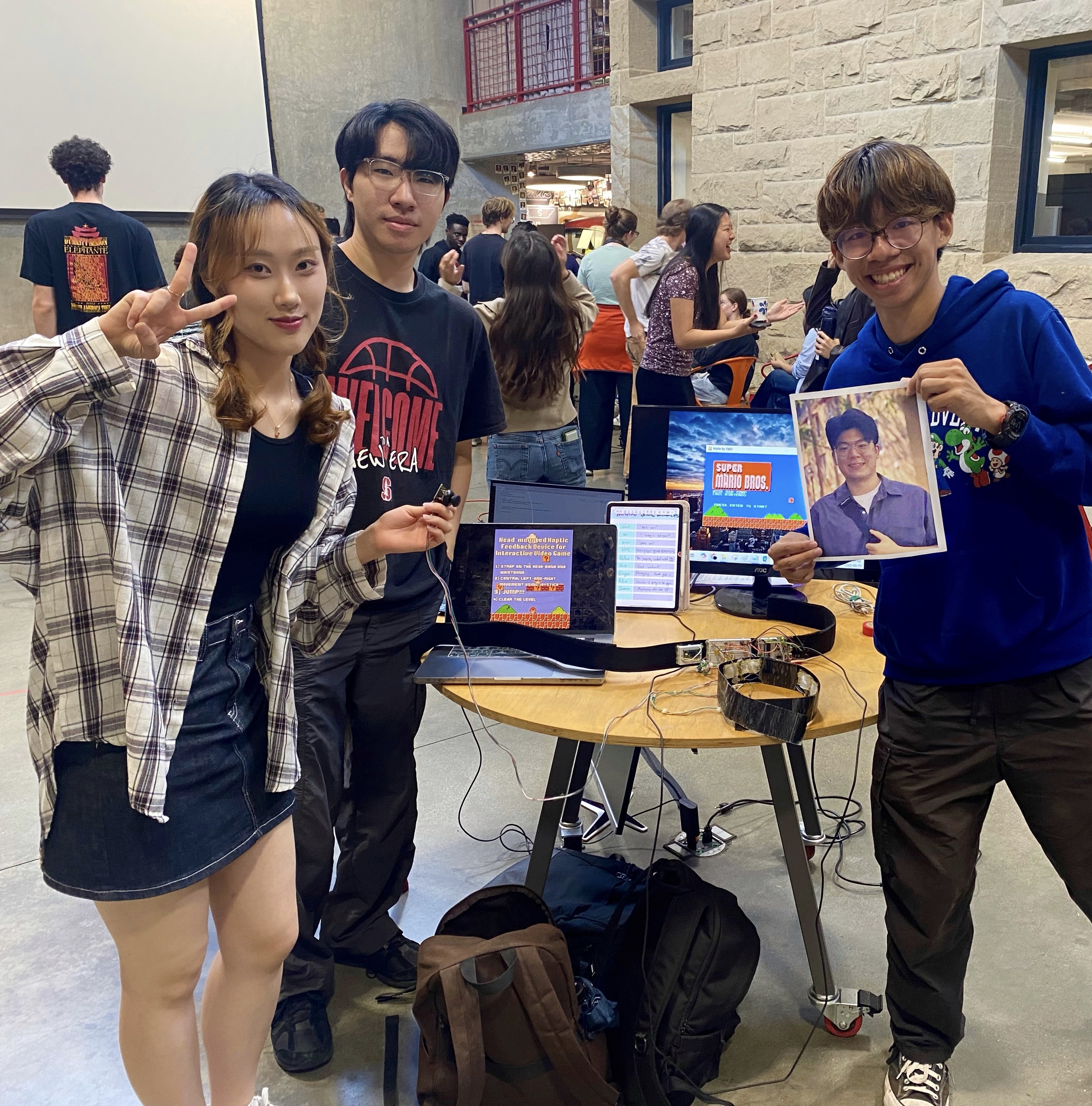
Group Picutre with Device Setup
at the 2025 Haptics Open House
Our project delivers an immersive, physically interactive platformer gaming experience by integrating real-time motion tracking and head-mounted haptic feedback. Motivated by the disconnect between physical movement and tactile feedback in conventional video games, we designed a system where users control Mario’s left and right movement with a joystick and trigger in-game jumps by physically jumping, detected via a waist-mounted IMU sensor. When Mario’s head collides with a block in the game, vibration motors embedded in a custom headband deliver immediate tactile feedback to the user’s forehead. The system was well received at the Haptics Open House 2025, with many users highlighting the novelty and fun of the interactive feedback, though some noted that the physical jumping component could be tiring during extended play.
Introduction
On this page... (hide)
For our project, we developed a bidirectional haptic interaction system that delivers an immersive Super Mario–style platformer experience. The motivation stems from the disconnection between physical exertion and sensory feedback in traditional gaming. While modern games provide rich visual and auditory environments, they rarely engage with the player’s sense of touch and physical movement. Our system addresses this gap by using custom haptic headgear embedded with vibration motors to provide tactile feedback from in-game events, such as Mario hitting a block. The player controls Mario using a joystick for lateral movement and an IMU sensor attached to the belt to detect jumping motions. These physical actions are directly translated into the game, making the experience more interactive and embodied. Through our system, we aim to explore key educational areas such as motion recognition, sensor integration, and haptic feedback design, while creating a more fun and immersive experience for the gamers in overall.
Background
From simple rumble to multi-modal immersion
Early console “rumble” controllers demonstrated that even coarse vibrotactile cues deepen engagement, sparking decades of research on richer haptics for games and VR. A recent narrative review traces this trajectory—from 18-century shock amusements through modern vibrotactile gamepads and cinematic seats—highlighting how tactile channels complement vision and audition in active entertainment (Gao et al. 2025). Commercial devices now deliver distributed body-level feedback: bHaptics’ TactSuit integrates 40 ERM motors across the torso, arms, and face, while Razer’s HyperSense ecosystem embeds high-bandwidth actuators in headsets and seat cushions, translating game audio into dynamic vibrations. These products show growing demand for untethered, lightweight haptic wearables but still rely on button presses or audio triggers rather than explicit user motion.
Head-mounted vibrotactile displays
Because the forehead is hairless, has high mechanoreceptor density, and stays inside the user’s field of view, it is an attractive site for event-based cues such as impacts or directional guidance. Research prototypes include MotionRing, a 360° sparse array that sweeps apparent motion around the cranium (Chu et al. 2021); directional gaze cueing headbands for hands-free navigation (Rantala et al. 2017); and DrivingVibe, which augments VR driving with head-localized collision warnings (Yu et al. 2017). Collectively, these studies report high cue detectability (<150 ms reaction times) and strong presence ratings, but most are limited to seated VR tasks.
IMU-based physical-action input
Low-cost inertial measurement units (IMUs) enable untethered capture of full-body movement. Sports science has produced robust jump-detection algorithms with >95 % accuracy and <5 cm height error using single waist- or shoe-mounted IMUs (Schleitzer et al. 2022; Keskinoglu et al. 2023). Similar classifiers distinguish basketball lay-ups and tip-ins, underscoring IMUs’ suitability for event-driven game control (Sonalcan et al. 2025). Yet these systems seldom close the loop with synchronous haptic output, leaving the kinesthetic-tactile channel under-utilized.
Why This Project Matters
While head-mounted haptics and IMU-based motion capture have each been widely explored in isolation—particularly in VR, gaming, and sports applications—fewer projects have combined the two in a tightly integrated, physically embodied interaction. This project offers an educational exploration of that intersection. By using a waist-mounted IMU to trigger Mario’s in-game jumps and providing localized forehead vibration upon block collisions, we implemented a simple but complete sensor-to-actuator feedback loop. This closed loop connects physical input and tactile feedback through a familiar game environment, helping us and our users reflect on how proprioception, vision, and touch can be aligned in real-time interaction. Though developed for a course setting, the system showcases how low-cost hardware can meaningfully approximate immersive human-computer interfaces, and may inform future directions in haptic game design, rehabilitation tools, or educational tech.
Methods
Hardware Design and Implementation

Final Headband Design
Final Waistband Design
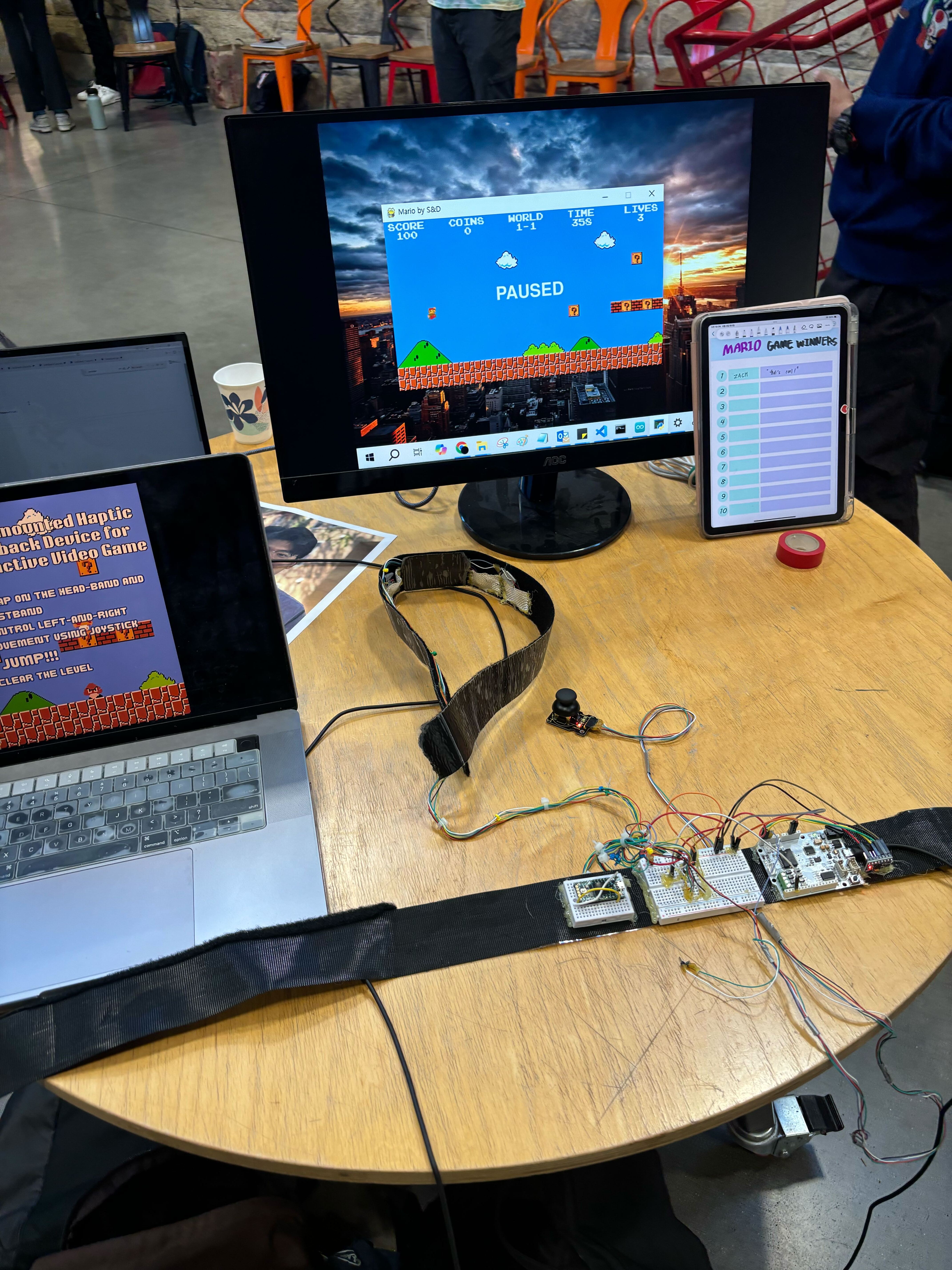
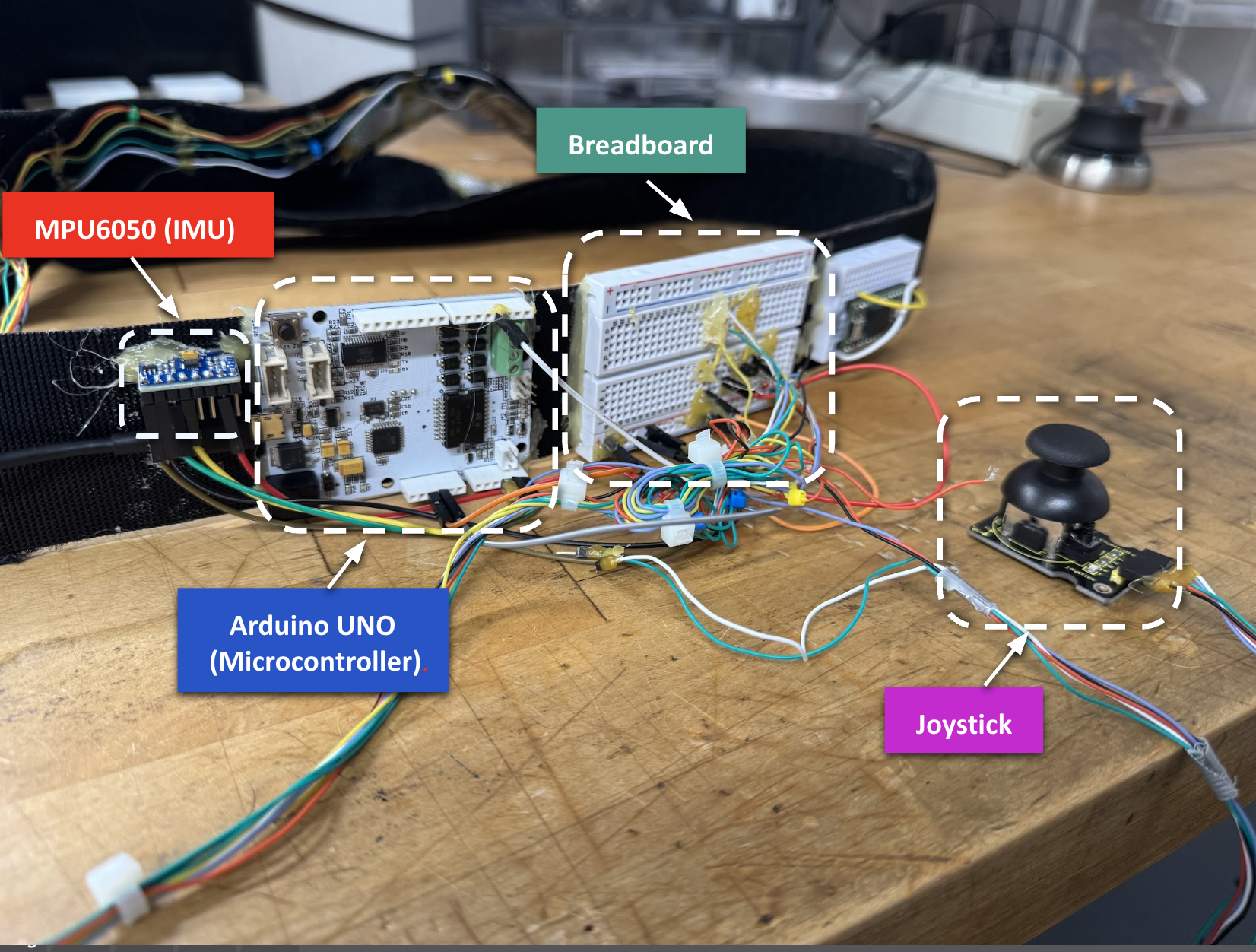
Our final design consists of two main wearable modules: a head-mounted haptic feedback device and a waist-mounted control and sensing unit. The headband is constructed from a Velcro-adjustable strap to accommodate different head sizes and is fitted with four 3V DC vibration motors, distributed evenly to maximize scalp contact and tactile feedback We placed soft padding over the wiring to enhance the comfort for the user as well. The headband is connected via a tether cord to the waist module, which houses the Arduino Uno microcontroller, a breadboard for circuit integration, the joystick for lateral control, and the MPU-6050 IMU sensor for jump detection.
Electrical Connections
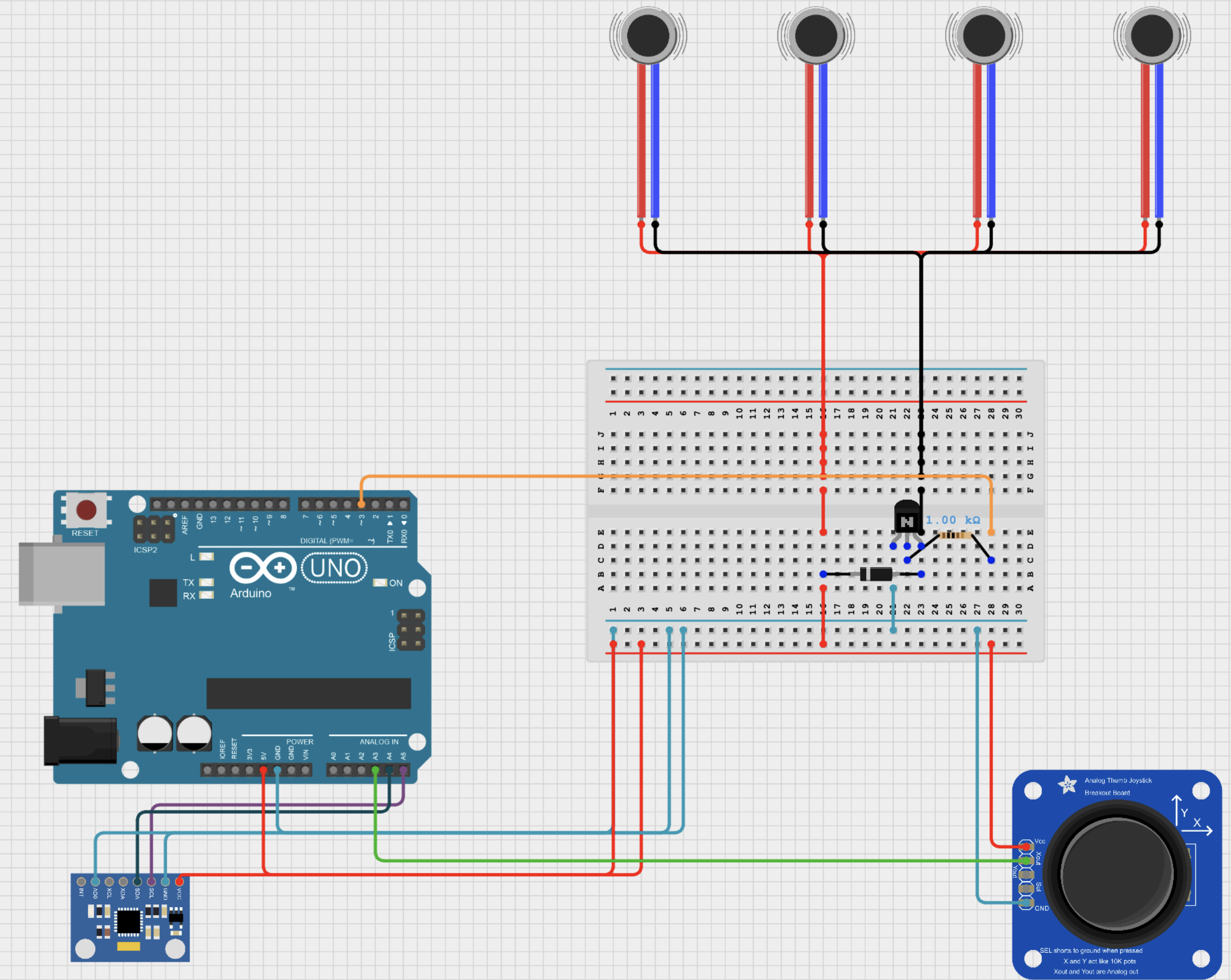
The electrical system integrates three main components: the vibration motors, the joystick, and the MPU-6050 IMU, all interfaced through the Arduino Uno microcontroller. The four vibration motors are wired in parallel and embedded in the headband, with their positive terminals connected to the Arduino’s 5V supply. Their negative terminals are routed through a single NPN transistor, which acts as a switch controlled by a digital output pin on the Arduino. A 1kΩ resistor is placed between the Arduino pin and the transistor base to limit current and protect the microcontroller. Each motor is also protected by a 1N4148 diode to suppress voltage spikes when switching.
The joystick is used for lateral (left/right) control and is connected such that only the X-axis output is read by the Arduino’s analog input. The MPU-6050 IMU, located at the user’s waist, is connected via I2C (SDA and SCL lines) to the Arduino for jump detection. The Arduino processes input from both the joystick and IMU, sending appropriate control signals to the game and activating the vibration motors when in-game events (such as Mario hitting a block) occur.
Software Implementation
Software Overview
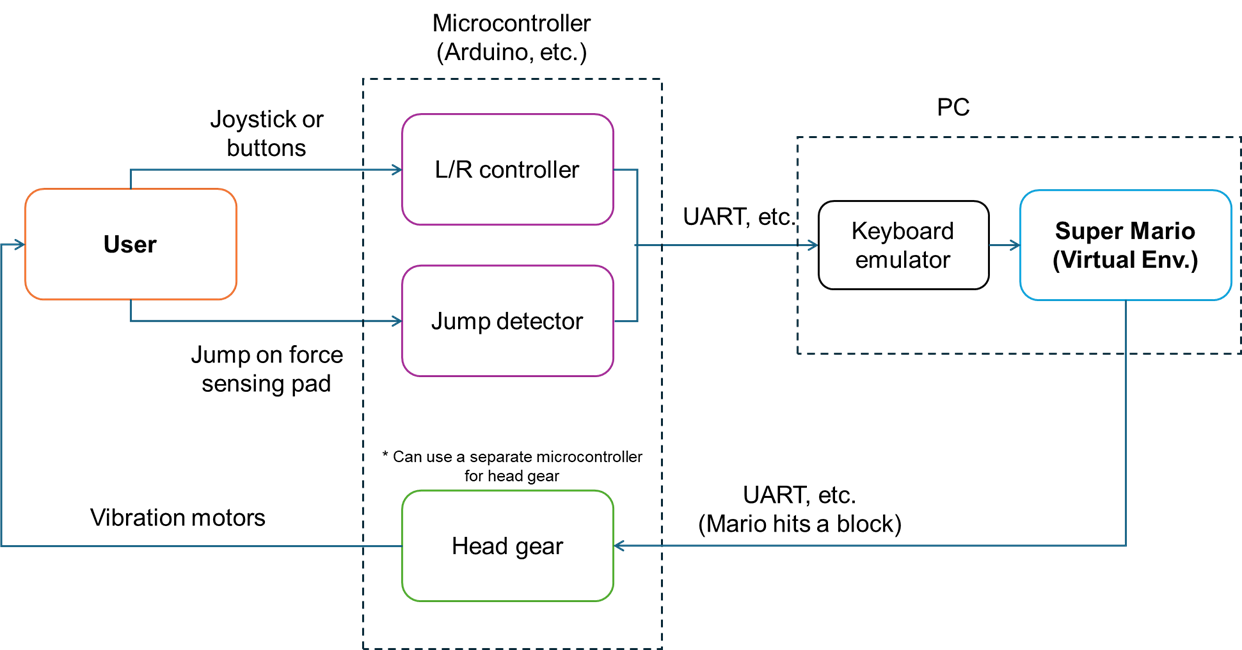
The system consists of two main codebases: one for the Arduino and one for the PC. The Arduino code handles real-time sensing, including jump detection using an IMU and left/right movement via a joystick. It also activates a vibration motor when triggered. The PC code receives these signals via serial communication, uses pyautogui to emulate keyboard inputs, and sends vibration commands back to the Arduino when Mario hits a block in the game.
Arduino System Overview
The Arduino program was developed for an interactive Mario-based haptic game system using an Arduino Uno. The system integrates joystick input, IMU-based jump detection, and vibration motor feedback, enabling physical interaction and real-time haptic response.
System Components & Functions
1. MPU6050 IMU for Jump Detection
- The MPU6050 accelerometer is initialized via I2C and read at each loop cycle.
- Jumping is detected using vertical acceleration (AcZ), which is converted to g-units.
- A jump event is defined as AcZ > -0.5g, triggering a virtual “UP” key press (U_DOWN). (Calibrated during pilot tests)
- After a predefined duration (UP_DUR = 1000 ms), a key release (U_UP) is sent.
- The state of jump transmission is tracked with isUpSent.
2. Joystick-Based Horizontal Control
- A joystick is connected to analog pin A3, with readings used to detect left, middle, and right states.
- Transitions between these states send corresponding serial commands (L_DOWN, L_UP, R_DOWN, R_UP) to control Mario’s horizontal movement.
3. Haptic Feedback with Vibration Motor
- Vibration motors connected to digital pin 3 (VIB_PIN_1) provides tactile feedback.
- When a VIB1 command is received via serial, the motor is activated for VIB1_DUR milliseconds.
- Feedback duration is managed using a timestamp (lastVibTime), and the motor is turned off after timeout.
4. Serial Communication Protocol
- Commands (U_DOWN, U_UP, etc.) are transmitted via serial to a host device (e.g., game engine or computer).
- The system also listens for incoming serial commands to activate the vibration motor.
PC Integration: Controlling Mario with Arduino Input
In this project, we connected an Arduino-based motion interface to a PC via USB and used its serial output to control Mario in a Python-based 2D platformer. The game was built using the open-source MarioPygame project (https://github.com/Winter091/MarioPygame), which replicates the classic Super Mario gameplay, including horizontal movement, jumping, collisions, enemies, and environmental interactions. Instead of modifying the game code directly, we used a separate Python script to simulate keyboard inputs based on Arduino signals.
Arduino-to-PC Communication
The Arduino sends single-byte signals over serial based on user input:
0x04 (L_DOWN): start moving Mario to the left
0x03 (L_UP): stop moving left
0x02 (R_DOWN): start moving right
0x01 (R_UP): stop moving right
0x06 (U_DOWN): initiate a jump
0x05 (U_UP): release jump
0x07 (VIB1): signal for head vibration (sent from PC to Arduino when Mario hits a block)
These signals are triggered by a joystick for lateral movement and an IMU for jump detection. For example, when the user physically jumps, the Arduino detects an upward acceleration spike and sends a U_DOWN signal to the PC.
PC-Side Integration with MarioPygame
On the PC, a custom script (SerialProcessor.py) using the pyserial library reads incoming bytes from the Arduino. Each byte is then mapped to a corresponding keyboard action using the pyautogui library, which emulates key presses (such as ←, →, or spacebar) to control the Mario character. This method allows us to interface with the game without modifying its source code.
Additionally, when Mario collides with a block from below, the game triggers a function that sends a VIB1 signal back to the Arduino. This activates the forehead-mounted vibration motor, completing a closed-loop feedback cycle between physical input and tactile response.
Summary
This system creates a seamless, low-latency interaction where physical gestures drive in-game behavior and the game environment responds with synchronized haptic feedback. By combining IMU sensing, joystick input, serial communication, and external key emulation, the system demonstrates how simple hardware can be tightly integrated with software-based gameplay to deliver an engaging and embodied user experience. Results
Results
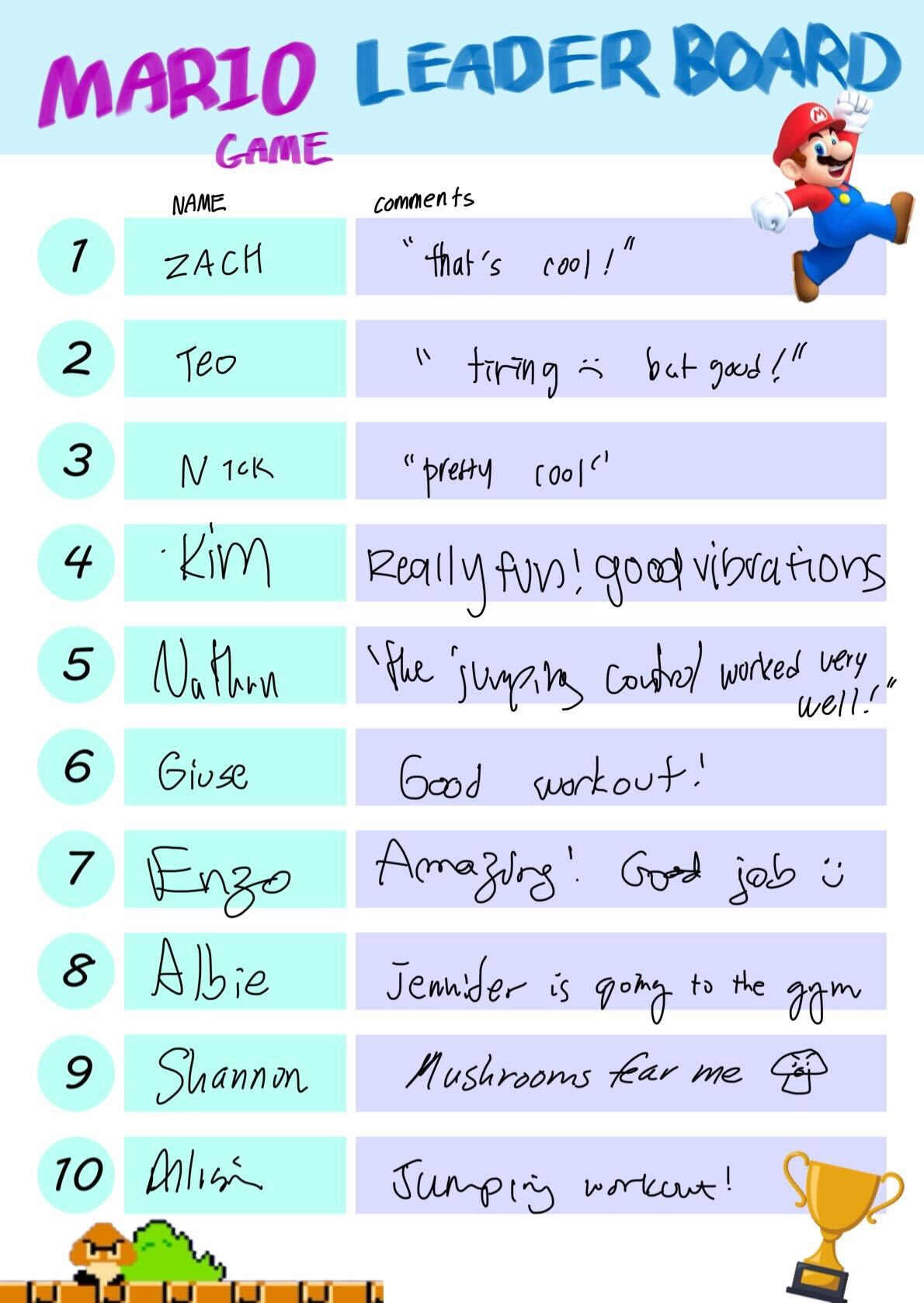
The system was well received at the Haptics Open House 2025. Many users highlighted the novelty and enjoyment of the interactive haptic feedback, especially the vibrations delivered through the headgear in response to hitting the blocks. Several participants noted that the experience felt more immersive compared to traditional gaming setups, making the game more exciting and fun. The users provided comments like “really fun, good vibrations” and “the jumping control worked very well.”, while some even described it as a “good workout,” reflecting the physical jumping interaction.
However, a few users noted that the physical jumping component, while enjoyable, could become tiring during extended play. Additionally, the current wired setup was noticed as a drawback, with cables interfering with the user's movements and reducing the overall comfort of wearing the gear. Based on this feedback, transitioning to wireless communication, such as Bluetooth, could significantly improve wearability and freedom of motion, making the system more suitable for longer or more dynamic gameplay sessions.
Overall, the feedback demonstrates that our system effectively showcases the potential of haptic integration in gaming, while also identifying areas for future improvement in comfort, accessibility, and system portability.

Future Work
1. Expanded Motion Recognition: Develop algorithms that use camera-based tracking or additional IMU units to capture walking, running, and fire-shooting gestures, allowing Mario’s full range of actions to mirror the player’s movements.
2. Multi-Dimensional Haptic Feedback: Beyond forehead vibrations during block collisions, integrate wind-like tactile cues for running and localized feedback for fire-shooting, creating a richer, more immersive haptic experience.
3. Rehabilitation Applications: Adapt jump-detection and haptic feedback into a game-based rehabilitation platform, using in-game tasks to encourage proper movement patterns and track patient progress.
4. VR Integration: Port the system to a VR environment so that players experience the game world stereoscopically, with IMU-driven jumps and headband haptics fully synchronized in virtual reality.
Acknowledgments
We would like to thank Prof. Alison Okamura for her guidance and encouragement throughout the project, and our beloved TA, Teo Ren, for helpful feedback and support during development. We also thank So Jinho and Tianyu Tu for generously lending us the vibration motors used in our prototype.
Files
This ZIP file contains both the Arduino code and the Python PC interface for our Mario-based haptic game system. The Arduino sketch reads IMU and joystick input to send control signals over serial, and receives vibration triggers. On the PC side, SerialProcessor.py uses pyserial and pyautogui to map incoming serial bytes to keypresses for controlling Mario in the game.
To run the system (while wearing the device):
Upload the Arduino sketch to an Arduino Uno.
Connect the Arduino via USB to your PC.
Launch SerialProcessor.py to begin serial listening and input emulation.
Run the MarioPygame game (main.py) and play using physical input.
References
Gao, Y., & Spence, C. (2025). What role does touch play in active entertainment? A narrative review of tactile feedback in gaming. i-Perception, 16(3), 20416695251336117.
Chu, S. Y., Cheng, Y. T., Lin, S. C., Huang, Y. W., Chen, Y., & Chen, M. Y. (2021, October). Motionring: Creating illusory tactile motion around the head using 360 vibrotactile headbands. In The 34th Annual ACM Symposium on User Interface Software and Technology (pp. 724-731).
Rantala, J., Kangas, J., & Raisamo, R. (2017, March). Directional cueing of gaze with a vibrotactile headband. In Proceedings of the 8th Augmented Human International Conference (pp. 1-7).
Yu, N. H., Ma, S. Y., Lin, C. M., Fan, C. A., Taglialatela, L. E., Huang, T. Y., ... & Chen, M. Y. (2023). DrivingVibe: Enhancing VR driving experience using inertia-based vibrotactile feedback around the head. Proceedings of the ACM on Human-Computer Interaction, 7(MHCI), 1-22.
Schleitzer, S., Wirtz, S., Julian, R., & Eils, E. (2022). Development and evaluation of an inertial measurement unit (IMU) system for jump detection and jump height estimation in beach volleyball. German Journal of Exercise and Sport Research, 52(2), 228-236.
Keskinoğlu, C., Özgünen, K. T., & Aydın, A. (2023). Designing and implementation of IMU-based wearable real-time jump meter for vertical jump height measurement. Transactions of the Institute of Measurement and Control, 45(14), 2648-2657.
Sonalcan, H., Bilen, E., Ateş, B., & Seçkin, A. Ç. (2025). Action Recognition in Basketball with Inertial Measurement Unit-Supported Vest. Sensors, 25(2), 563.
Appendix: Project Checkpoints
Checkpoint 1
Arduino Simulation
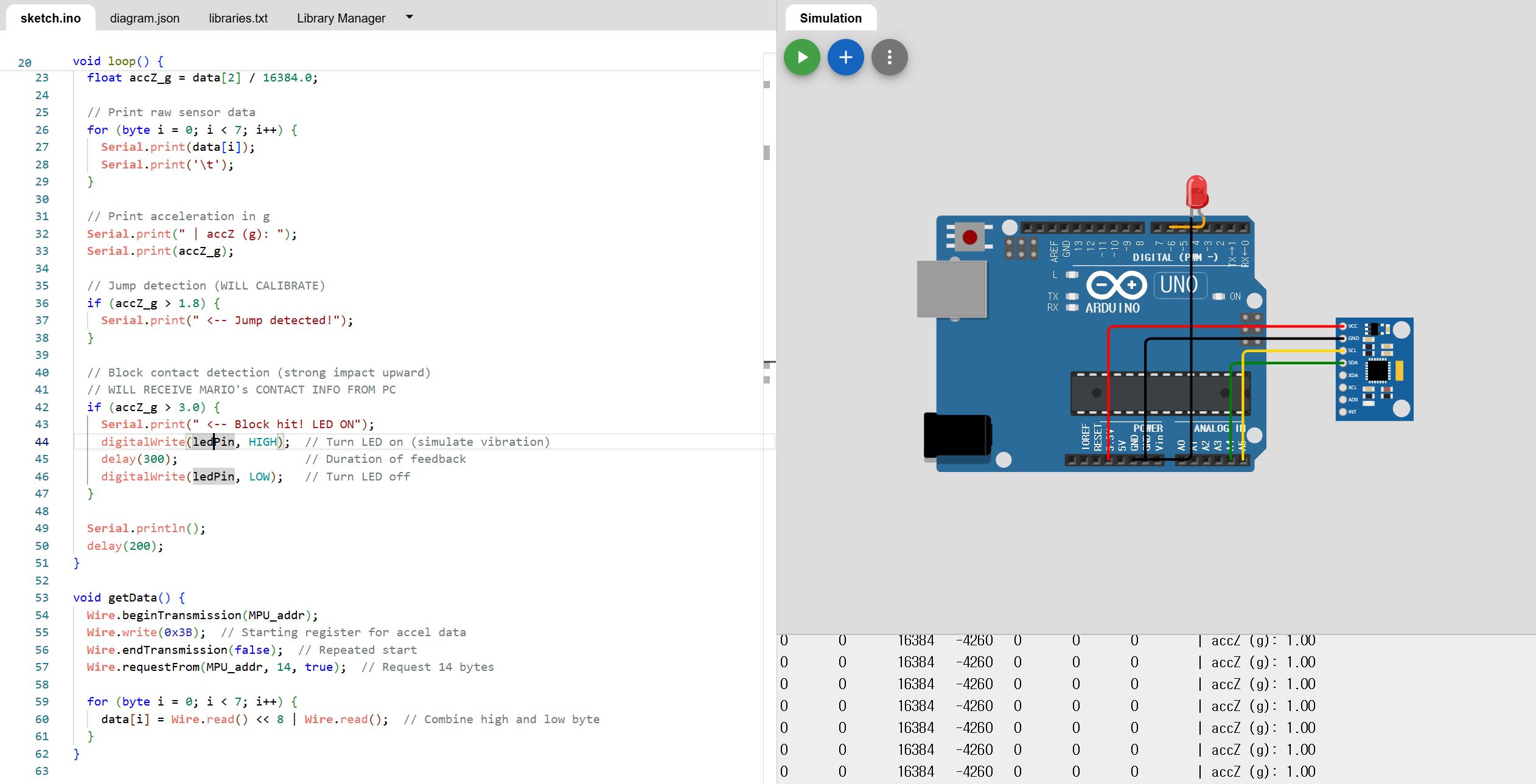
In preparation for hardware implementation, we first validated our design in the Wokwi Arduino simulator by drafting the circuit and writing pseudocode to verify pin assignments and logic flow. Our firmware reads raw acceleration data from the MPU6050, converts the Z-axis reading to g-units, and uses a provisional threshold of accZ_g > 1.8 to detect takeoff; this value will be calibrated empirically once the physical sensor arrives. Block collisions are currently emulated in code but will ultimately be triggered by collision signals from the PC when Mario interacts with in-game objects. To simulate haptic feedback in Wokwi, we use an LED as a stand-in for a vibration motor, momentarily illuminating it upon block detection. Next steps include fine-tuning the jump threshold with live sensor data, developing a wearable headgear prototype to house the IMU, and integrating the system with the PC to achieve real-time synchronization of Mario’s actions.
Simulation link: https://wokwi.com/projects/431420210142337025
Prototype Design
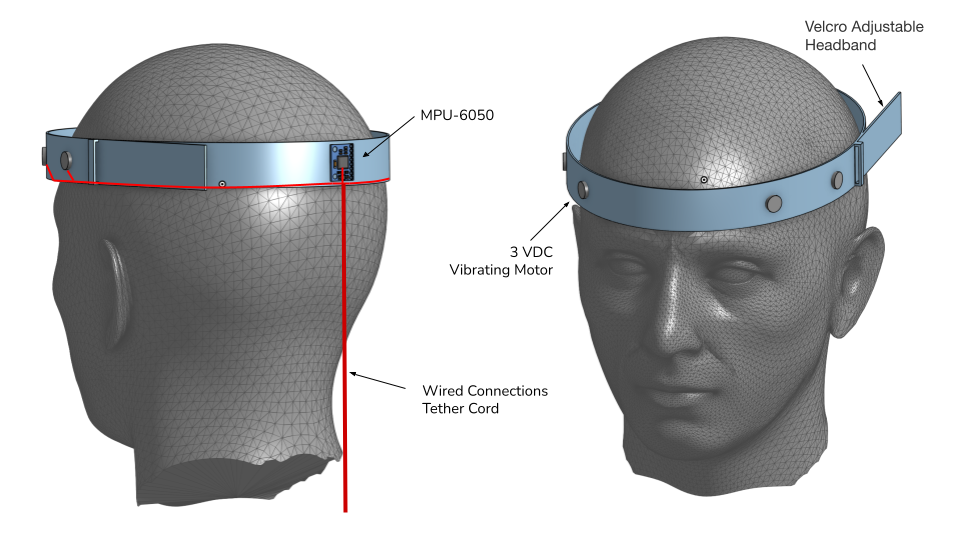
The initial prototype consists of a headband with velcro adjustment to accommodate different head sizes, ensuring a secure and comfortable fit. Integrated into the headband are a 3V DC vibrating motor, positioned to provide haptic feedback to the scalp, and an MPU-6050 IMU sensor for motion tracking. Both components are placed to maintain reliable contact with the user's head and optimize sensitivity. The system employs a wired connection that runs from the headband to a tether cord, which is intended to connect to a module worn at the user's waist before continuing to the computer. This configuration is designed to keep the headgear lightweight and reduce cable interference during user movement, while also supporting stable power delivery and signal transmission.
Interfacing with Super Mario Bros on PC
To prepare a game for real users to play, software has been developed based on a publicly available Pygame implementation of Super Mario Bros. (https://github.com/Winter091/MarioPygame) The software is designed to meet the following requirements:
- Receive joystick input from the user via serial communication and convert it into keyboard signals using pyautogui (joystick → UART → Python script → emulated keyboard inputs)
- Control Mario using the converted keyboard inputs (left/right/jump)
- Detect when Mario hits a block with his head
- Trigger an embedded vibration response via serial communication upon detecting a collision
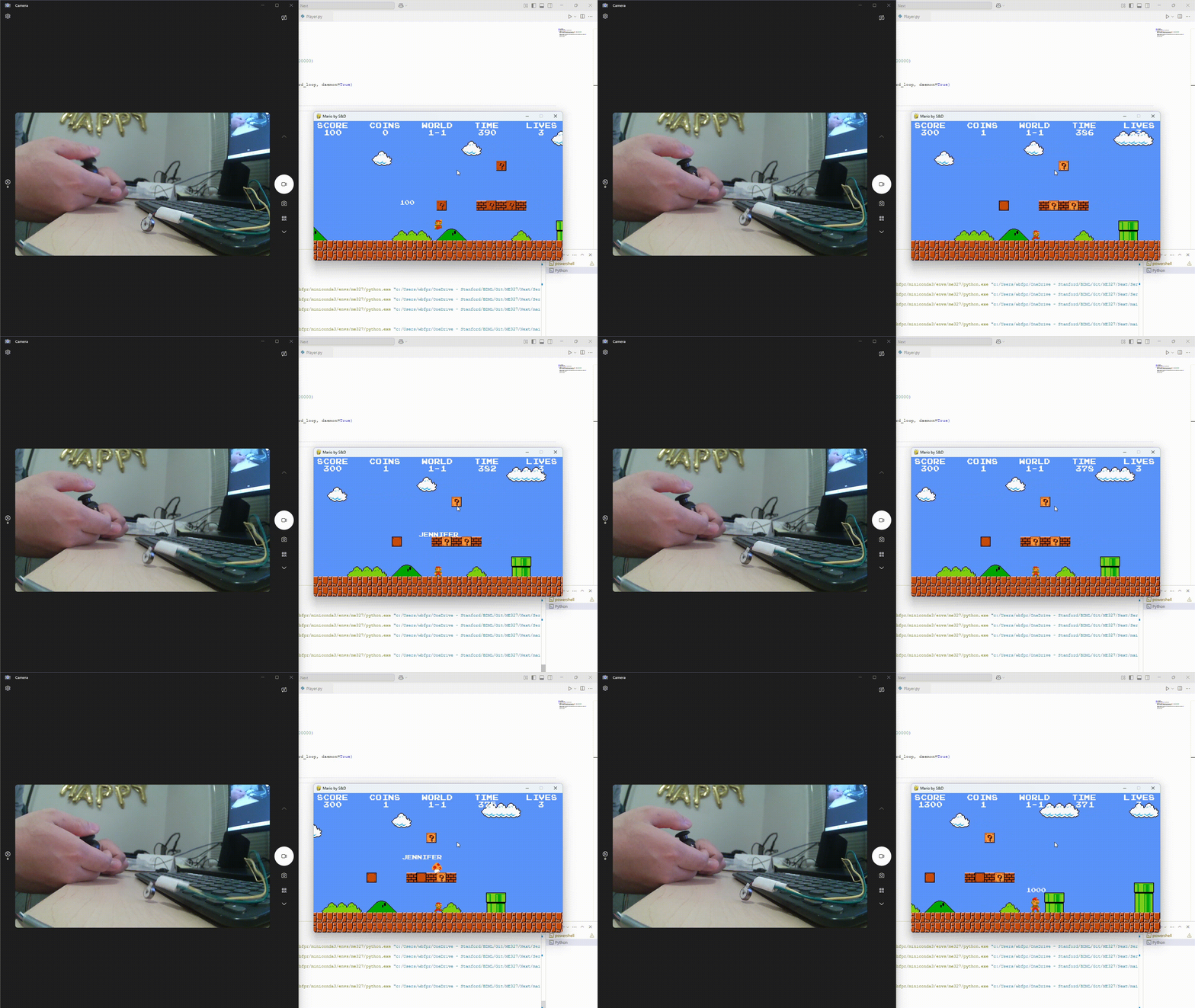
Among these, the PC-side implementation of items (2) and (3) has been completed. As shown in the gif, when Mario hits a block with his head, the collision is detected and a message saying "ME327" is currently printed. By Checkpoint 2, this will be replaced with a serial signal to trigger the vibration module.
Additionally, it is confirmed that Mario can be controlled in-game using pyautogui that emulates predefined keyboard input patterns.

Checkpoint 2
Headgear Construction
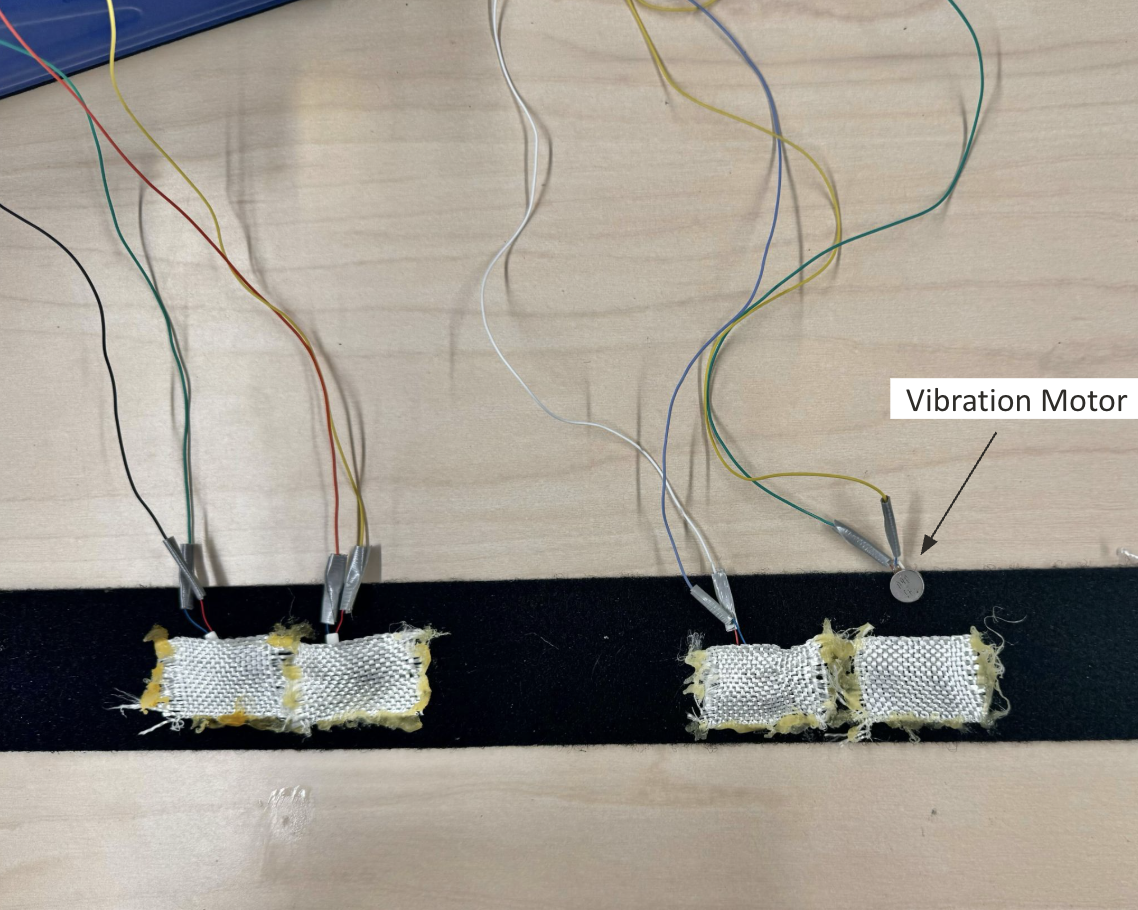
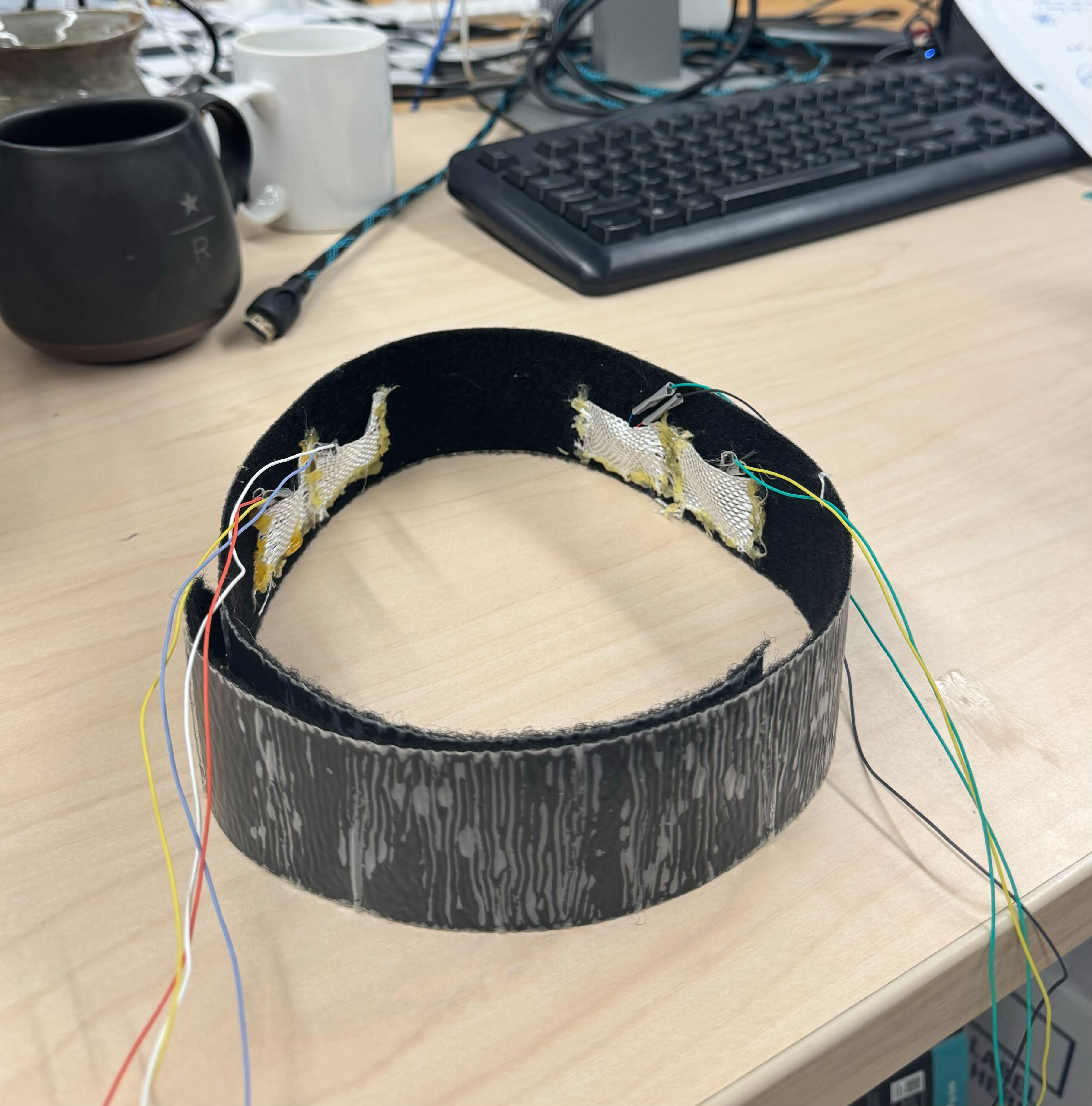
The headgear prototype has been constructed using a Velcro-adjustable headband. The design incorporates pouches glued to the headband fabric to securely house the vibration motors while maintaining proper contact with the user's scalp, which helps ensure consistent positioning of the haptic actuators and prevents component displacement during user movement.
Implementation of Movement
At this stage, the motion controller for lateral movement has been implemented using a joystick, allowing users to move Mario left and right within the game environment. The integration has been verified by observing Mario’s movement in response to joystick input, as demonstrated in the attached gif. However, the MPU-6050 IMU sensor for jump detection is still pending delivery. The software infrastructure for jump control is in place and will be activated once the sensor is available. Additionally, the system is configured so that when Mario’s head collides with a block in the game, a signal is immediately sent from the PC to the haptic controller, triggering the vibration motor with virtually no perceptible latency.