

2025-Group 7

Project Setup at the open house
Haptic Maze
Project team member(s): Mariam Colborn, Ki Ahn, Hamad Iqbal, Sebastian Andres Colondres-Torres
Our project is a Big Game themed maze-based platform game that combines mechanical design, control systems, and real-time graphics to create an engaging haptic experience. Users control a vertical, two-degree-of-freedom pantograph to navigate a virtual forest maze, collecting axes while avoiding Oski the Bear. As they move through the maze, players experience real-time haptic feedback, such as resistance when hitting walls and effects like oscillation or damping when in contact with an axe or Oski. The system features a custom-designed controller, force rendering through Jacobian-based control, and an intuitive user interface enhanced with synchronized visuals and sound. We presented the final system at the ME327 Open House, where despite problems with our motors generating force feedback, test participants responded positively to both the mechanical performance and the entertainment experience.

2025 ME327 Group7 team photo at the open house
On this page... (hide)
Introduction
We created a game inspired by Pac-Man and the Stanford-Cal football rivalry to explore both dynamic force rendering and complex mechanical design. Our goal was to apply basic haptic principles in creative ways while addressing the unique challenges of building a vertical, two-degree-of-freedom pantograph. The result allowed us to meet both objectives through an interactive and engaging gameplay experience.
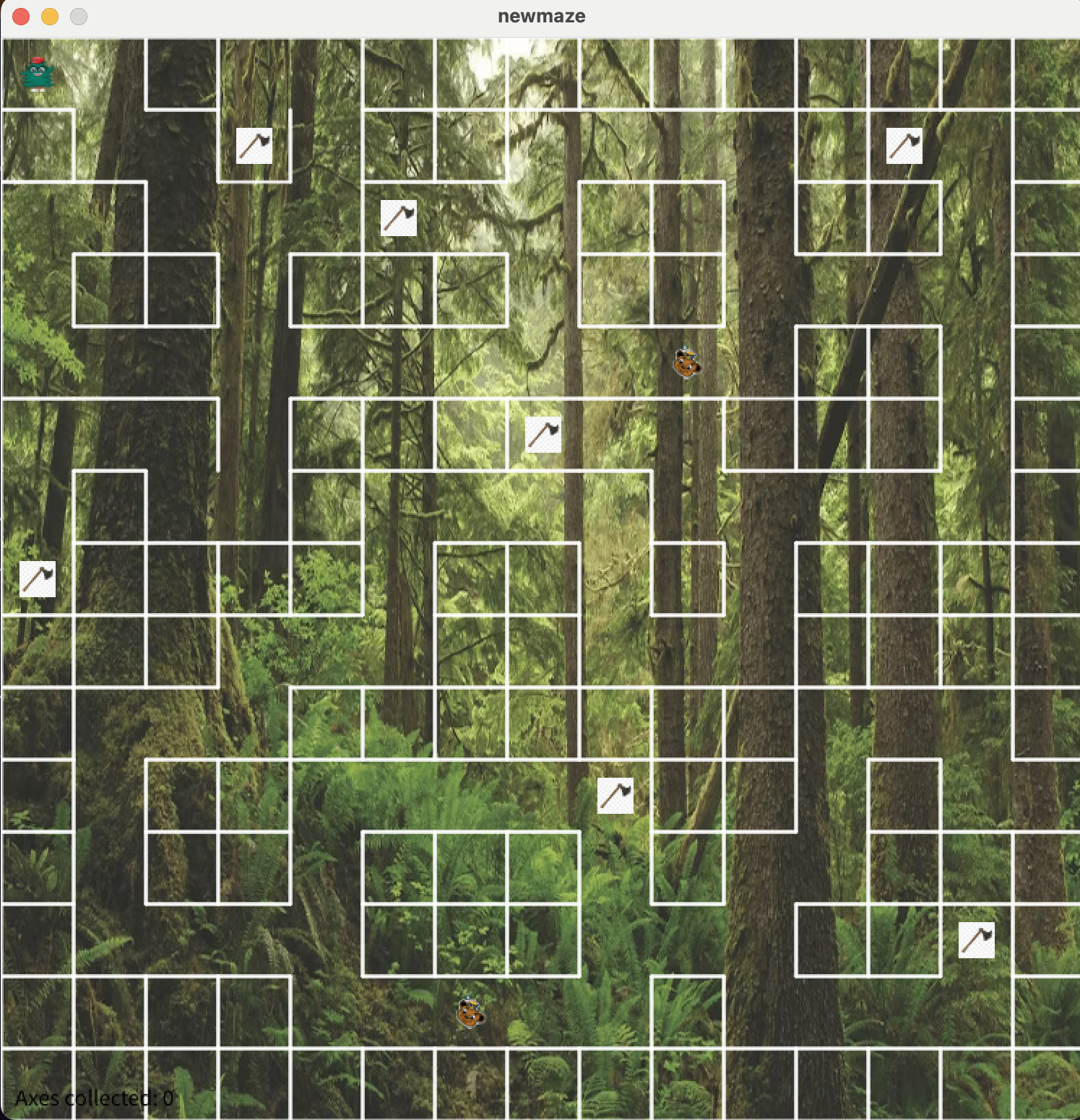
In the game, users navigate a cursor through a maze to collect scattered axes, which when interacted with triggers a pop-up notification and grants two seconds of enhanced acceleration. If the player collides with the obstacle—Oski the Bear—a message appears stating, “The bear has caught you,” and a pulling force draws the user towards him. Once all four axes are collected, the game is over.
Background
Our work on this project contributes to the broader field of haptic interface design, which focuses on conveying information to users through computer-controlled forces. Effective haptic systems aim to render these forces clearly and intuitively while minimizing internal interference. To achieve this, designers emphasize several key criteria: high structural stiffness, low apparent mass/inertia, minimal backlash, and low friction [1].
Kuchenbecker et al. emphasize the importance of mechanical transparency in haptic devices, where the system itself does not obstruct or distort the user's perception of contact. In their design, careful attention is paid to friction reduction, motor selection, and signal responsiveness, allowing for accurate rendering of both texture and discrete contact events [1].
To implement two-dimensional force rendering, we employed a vertical 2-DOF pantograph mechanism. This configuration enables planar motion through a closed-loop linkage, providing predictable and controllable dynamics. Kim et al. demonstrate that even compact 2-DOF haptic systems can deliver directional cues effectively, provided that force output and feedback timing are well calibrated [2]. Though their actuator is electromagnet-based, their insights into spatial coverage and feedback consistency informed our thinking about workspace design and force distribution.
Beyond mechanical performance, we were also inspired by the field of expressive haptics. MacLean discusses how tactile feedback can be exaggerated rather than strictly realistic to make interaction more meaningful and intuitive [3]. MacLean emphasizes the importance of aligning haptic feedback with users' expectations, especially when designing for learning, entertainment, or exploration. These ideas support our use of non-physical effects such as exaggerated damping, oscillations, and directional forces to enrich the player's experience in our maze environment.
Haptic Rendering
In this project, our goal is to create an expressive experience that extends beyond visuals to include touch. Due to both the computational limitations of the Arduino and the physical constraints of our pantograph, we are unable to render surfaces with complete realism. However, the lack of physical accuracy does not prevent us from effectively communicating tactile information to the user. These constraints place our work within the broader domain of non-photorealistic rendering, a concept rooted in computer graphics, where visual fidelity is sacrificed in favor of clarity and expressiveness.
The same philosophy can also be applied to haptic feedback. As described by MacLean [3], expressive haptics can be used to exaggerate interaction effects to convey intention more clearly. In our case, haptic forces were deliberately tuned to emphasize user-state transitions. For example, when the user collides with a wall, the system applies directional resistive forces that quickly inform the user they have reached a boundary. When the user contacts the in-game obstacle, Oski the Bear, a pulling force is applied toward the bear’s position, accompanied by a visual and textual message indicating that the bear has caught them.
During the two-second acceleration period following axe collection, damping forces are temporarily reduced to enhance responsiveness and simulate increased player speed. These effects are not physically realistic, but that is not their purpose. Instead, each haptic event is designed to align with what the user sees and hears on screen, reinforcing immersion.
The goal is to create intuitive and easily recognizable force cues that work reliably under limited hardware conditions. Rather than attempting to mimic the real world, our system communicates game-state transitions through tactile exaggeration and simple, well-defined force profiles.
Methods
Hardware Design and Implementation
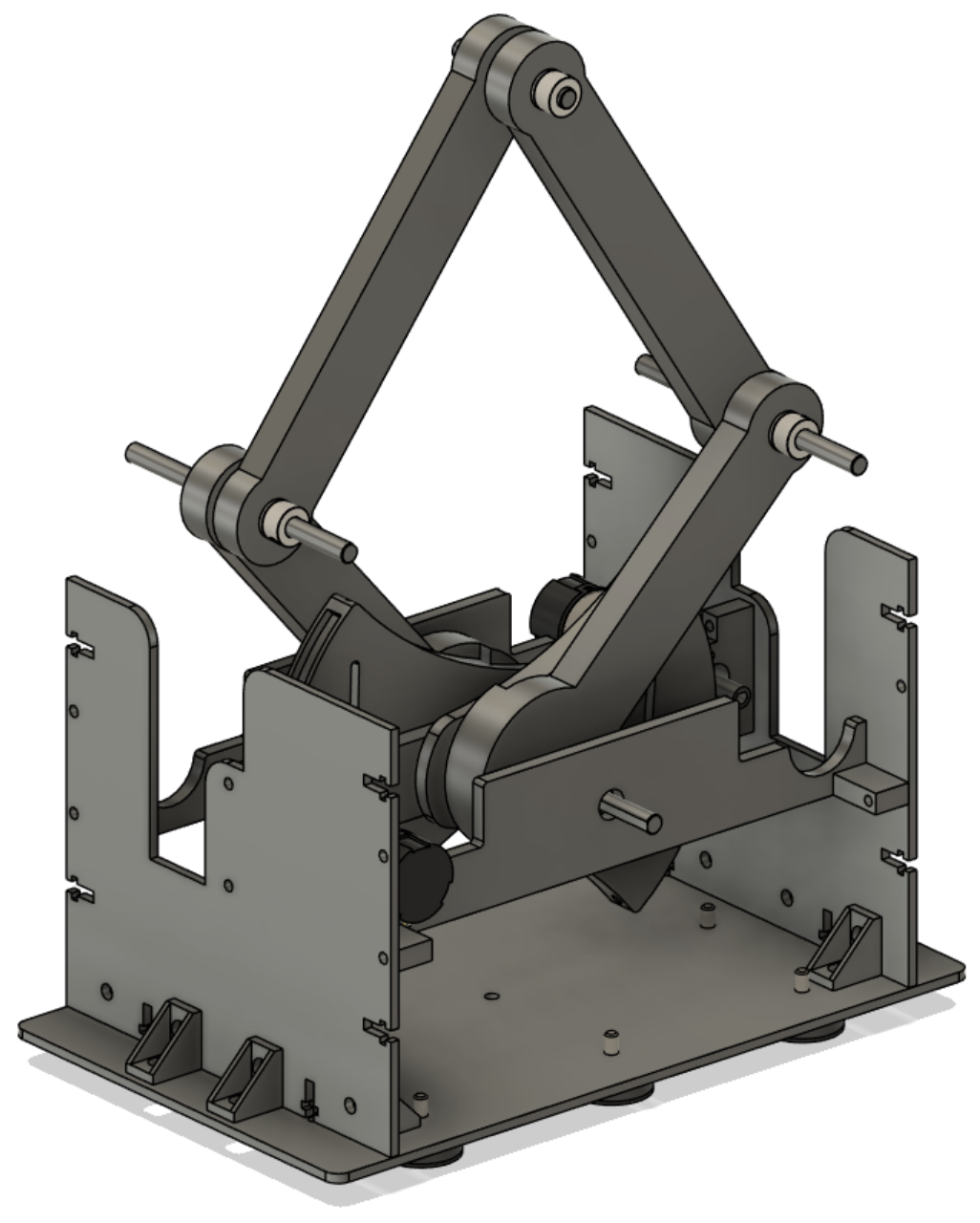
CAD Assembly
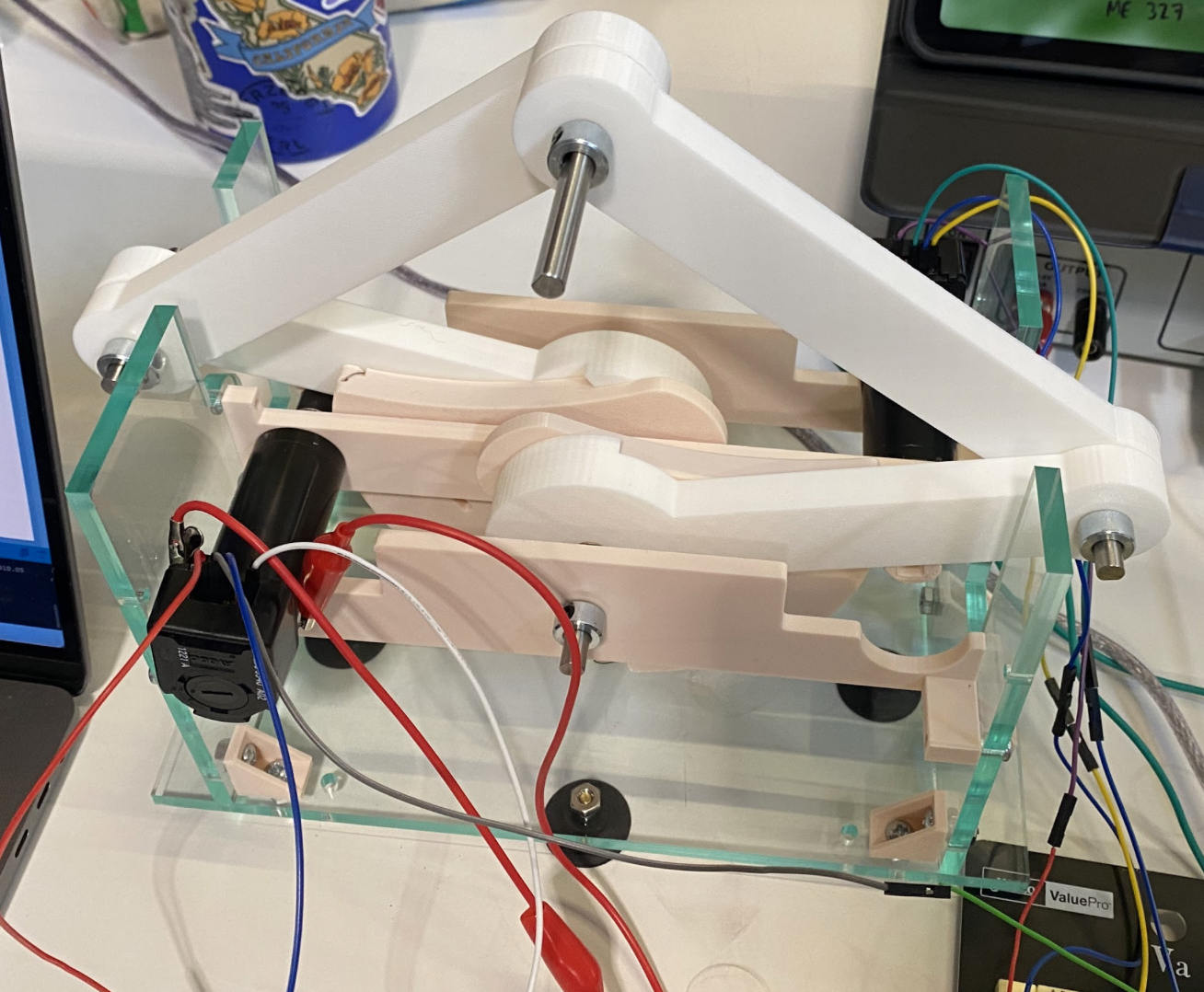
Final pantograph assembly
Our pantograph is based on the vertically mounted 5-bar linkage developed by the 2024 Haptic Kong team (https://charm.stanford.edu/ME327/2024-Group1), which itself built upon the CHARM Lab's GraphKit. We preserved their geometry and control framework, but made several mechanical and integration changes to better suit our specific design constraints.
The main structural change was reducing the distance between the front and rear crossbeams, which allowed us to make the system more compact and reduce structural flex during high-speed motion. We also redesigned the rear cross beam with a C-shaped geometry that allowed both motors to mount securely on top of the structure. We considered allowing the motors to float unsupported but decided that this could introduce unwanted vibration or deflection, especially during direction changes; therefore, the rigid mount was prioritized to preserve accuracy.
The system is driven by a single Arduino-based Hapkit board. Each of the two motors is equipped with a quadrature encoder, with both encoder signals connected to interrupt-capable pins. The control loop runs in real-time, computing motor angles, applying forward kinematics to determine the end-effector position, and using the Jacobian transpose to map desired end-effector forces into joint torques. These torques are then converted into PWM duty cycles and applied to the motors to generate force feedback.
All encoder sampling, kinematic computation, and force rendering are performed within a loop on the Arduino. This configuration reduces wiring complexity, ensures tight timing for feedback updates, and enables a self-contained, portable system without compromising performance.
System Analysis and Control
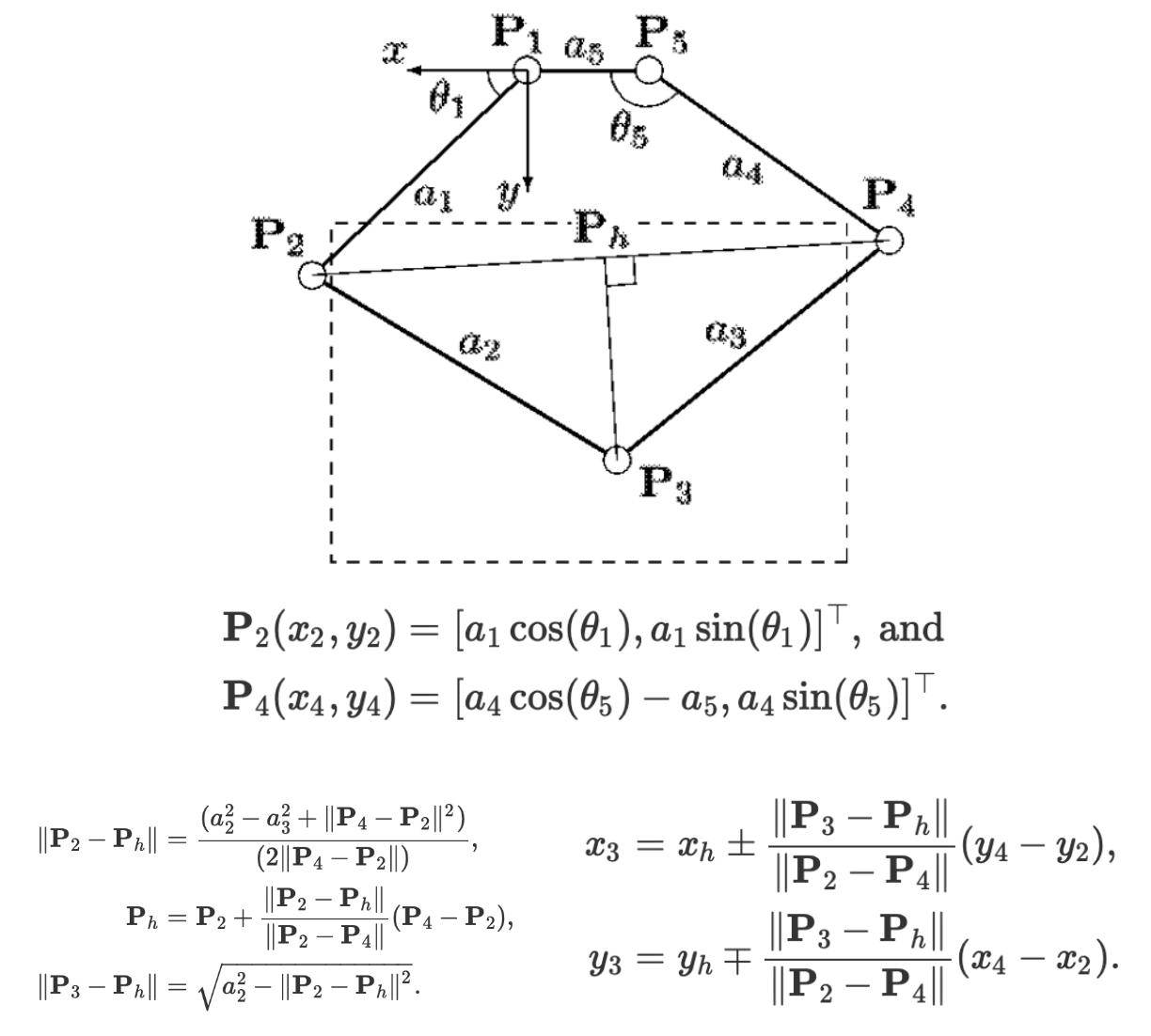
The kinematics were implemented by utilizing motor angle measurements obtained from the encoders and programming the equations below, which were reported by Campion, Wang, and Hayward [4].
Forces were then rendered using the transpose of the Jacobian by programming the equations below.
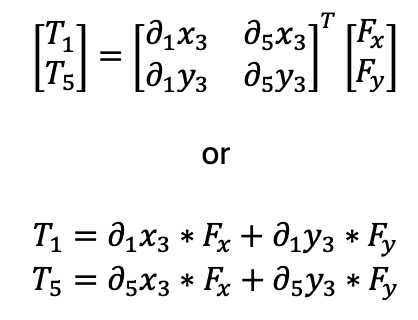
The partial derivatives were computed using the following equations, which were also reported by Campion, Wang, and Hayward [4].

Dynamics Study: Virtual Environment Analysis
A dynamics study on the obstacles rendered in the virtual environment was performed. The equations used to render forces with these obstacles are described below. To evaluate the efficacy of the force renderings and analyze the dynamics of the virtual environment further, data was collected from the Arduino and plotted for each obstacle.
In the following equations, the upper vector component corresponds to the horizontal x direction, and the bottom corresponds to the vertical y direction. That is,

Maze Walls:
When the user enters a wall or floor, the control system analyzes the user’s prior and current position to determine the direction of entry and renders an opposing force accordingly. The algorithm used to determine entry direction and the corresponding force is summarized below:
Bottom-side Wall: If…
- The user’s current vertical position is greater than his or her previous position (i.e. moving up).
- The previous position was below the wall bottom.
Then the force is…

Top-side Wall: If…
- The user’s current vertical position is less than his or her previous position (i.e. moving down).
- The previous position was above the wall top.
Then the force is…

Left-side Wall: If…
- The user’s current horizontal position is greater than his or her previous position (i.e. moving right).
- The previous position was outside the wall’s left side.
Then the force is…

Right-side Wall: If…
- The user’s current horizontal position is less than his or her previous position (i.e. moving left).
- The previous position was outside the wall’s right side.
Then the force is…

For all equations above, a value of kwall = 1 N/mm = 1000 N/m was used. This value was tuned empirically to create a stiff wall without vibrations or instability. Notably, this is a larger stiffness than was typically rendered with the Hapkits since the motors used were capable of a higher maximum torque.
Oski Lure:
When the player runs into Oski the Bear, he attempts to lure them— the player feels a force drawing them in that gets larger the closer to Oski they get. This was accomplished using a quadratic equation, where the square of the player's distance to Oski is proportional to the force.
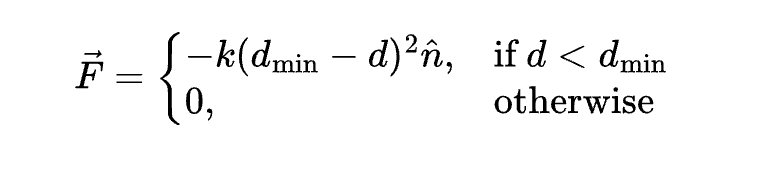
In this equation, d_min represents a threshold distance so that the player is only lured towards Oski when they are within the threshold, as to not draw the player in when they are at other points of the maze. The current distance between the player and Oski is represented by d, and k is the stiffness constant of 1000 N/m.
Axe Collection:
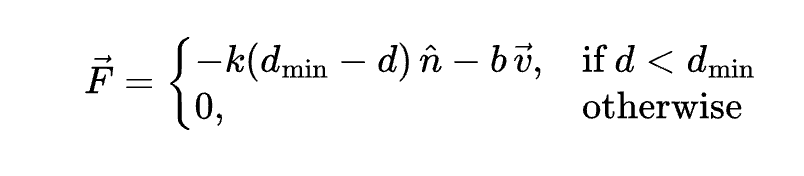
A two-second oscillation effect occurs when the player comes into contact with an axe. The force equation includes a damping velocity term so that it doesn't simply converge but can oscillate. We chose a damping constant b of 15 in order to achieve oscillations that would dampen within 2 seconds.
Results
Overall, the system demonstrated stable performance and accurate tracking. The end-effector position closely matched the on-screen cursor throughout the entire workspace, and the motion across the maze was smooth and responsive. The system was mechanically robust, and the kinematic mapping produced reliable behavior without noticeable drift or jitter.
However, despite the correct implementation of the control loop and Jacobian-based force computation, we were not able to render force feedback successfully. As a result, the player could move freely across the maze without encountering resistive forces at the walls or any effects from Oski or the axes. While this limited the expressive haptic experience, all other in-game mechanics—including collision detection, power-up activation, and timed popup messages—functioned as intended.
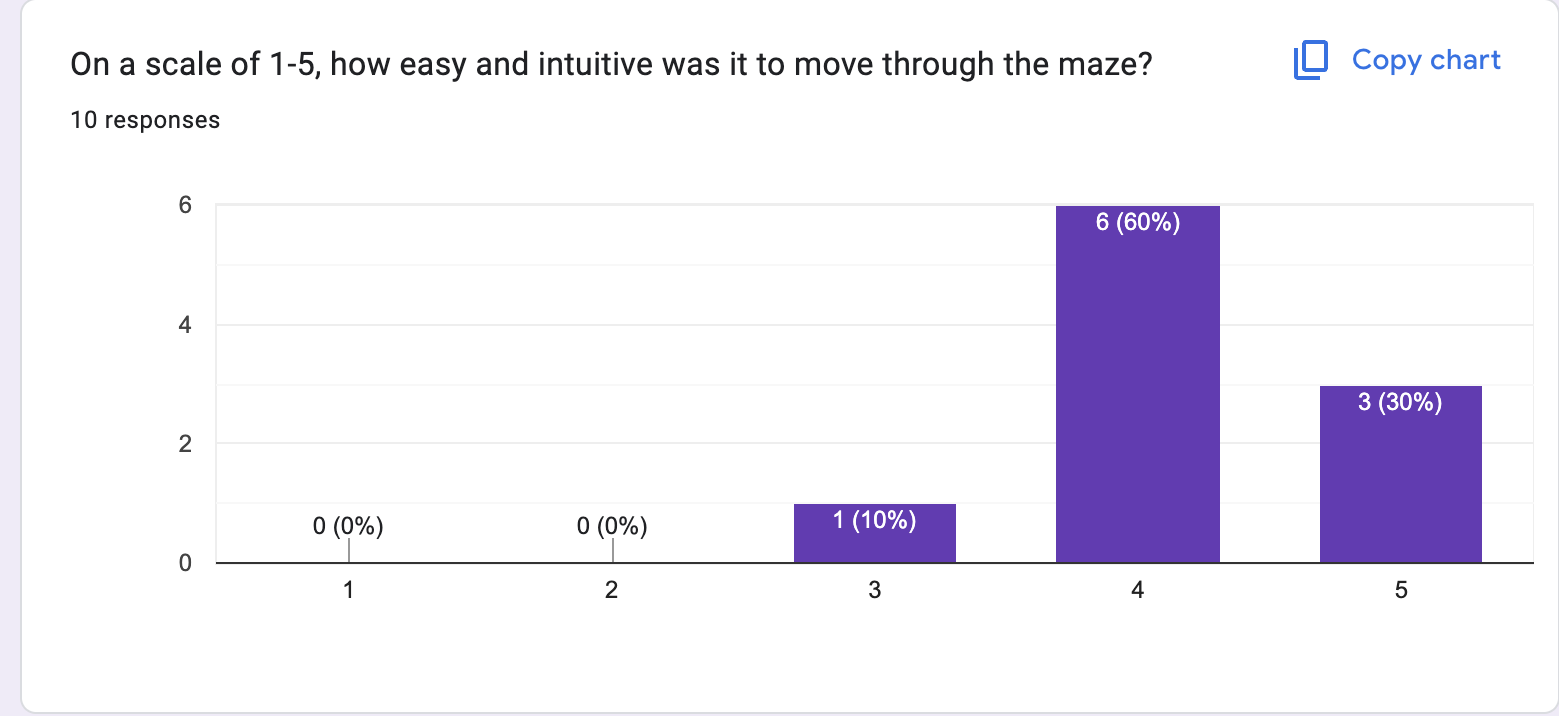
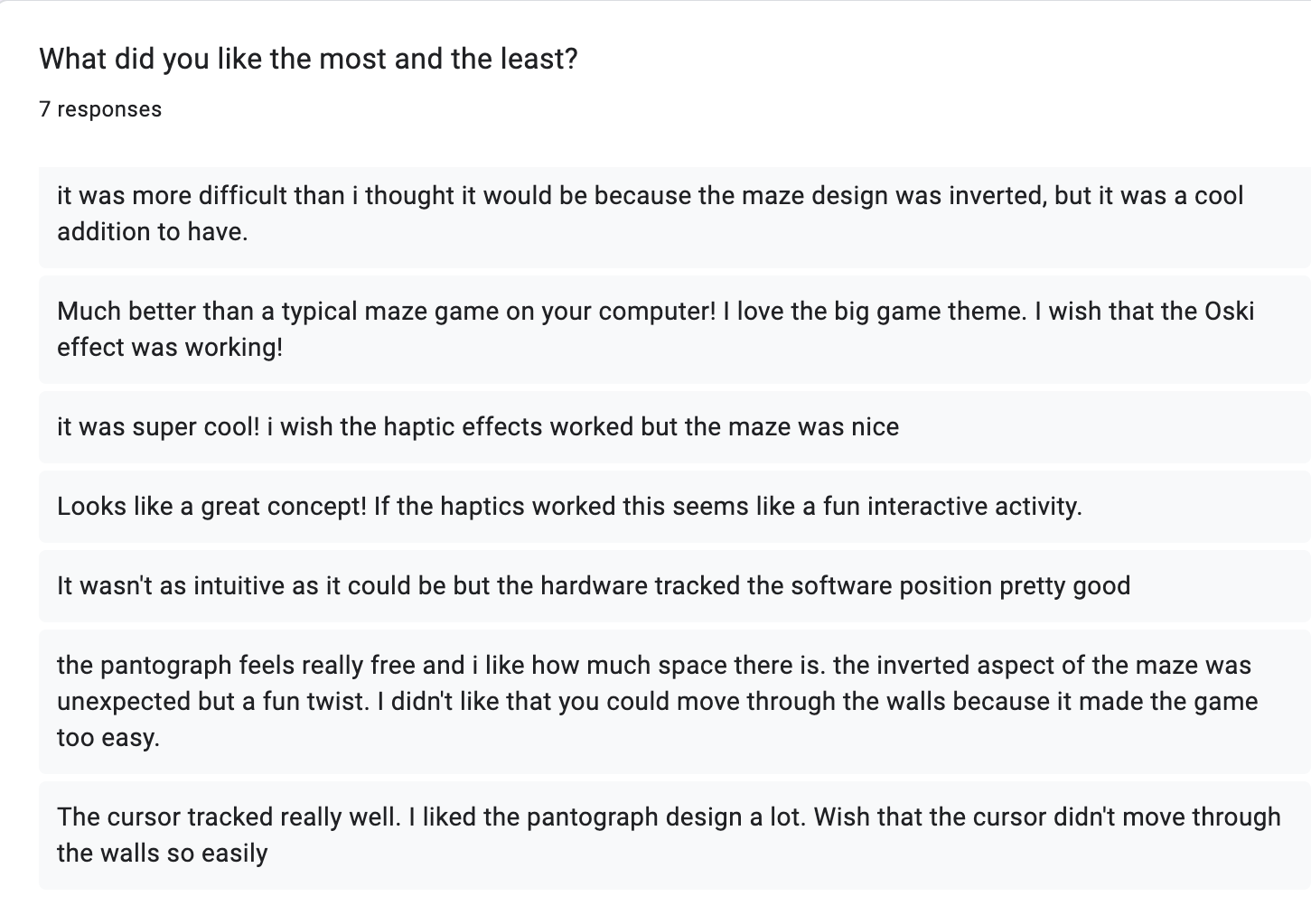
Because haptic effects were inactive, the game could be completed by passing through walls, which made timing results ambiguous. If a player followed the correct maze path, the average completion time was roughly 30 seconds. However, bypassing the maze using direct motion to the goal could reduce completion time to just a few seconds. We had 10 users test out the demo and asked them to fill out a form about their experience, letting them know beforehand that our haptic renderings weren't functioning. When asked to rank how easy and intuitive the maze-pantograph connection was from a scale of 1-5 (1 is the worst, 5 is the best), 90% of the participants ranked either a 4 or 5.
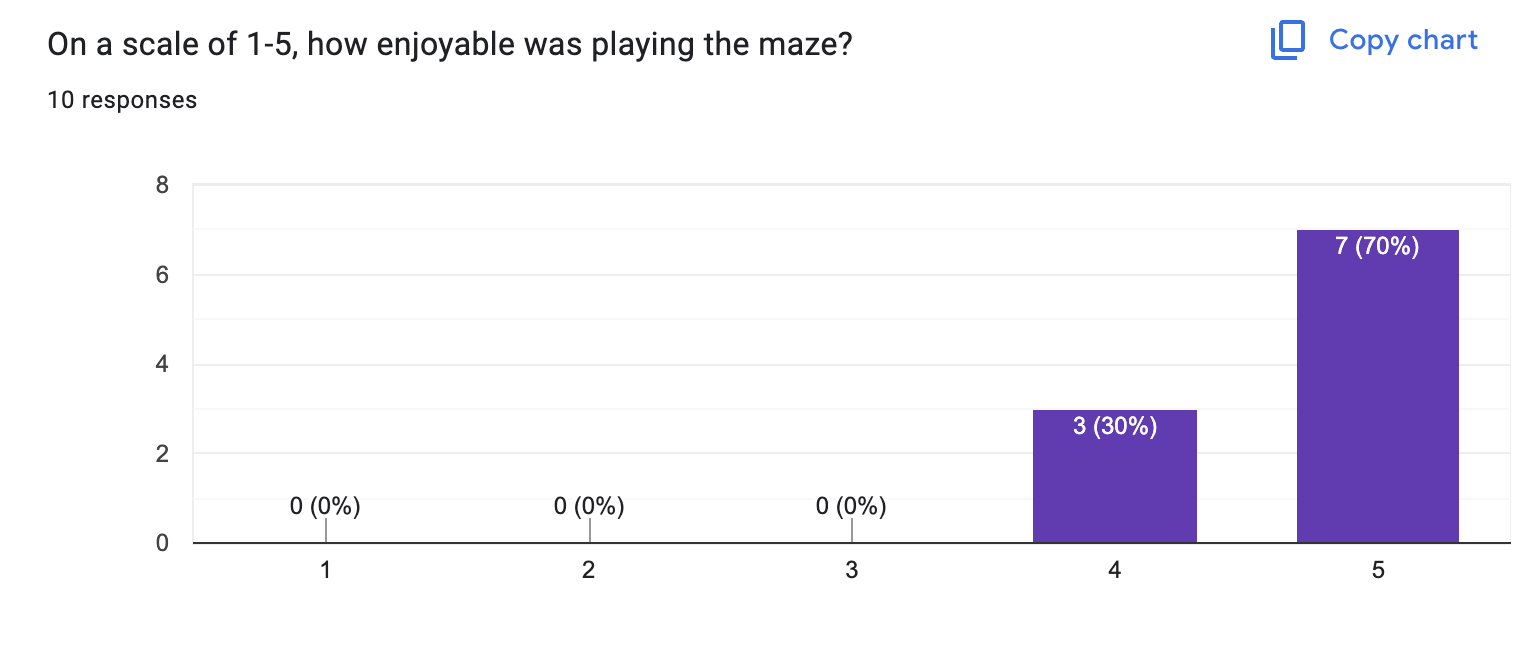
Participants were also asked to rank how entertaining and enjoyable the game was relative to a maze-keyboard game. 70% of participants ranked it a 5, with 100% of participants finding the game to be more entertaining than a typical maze game played with a keyboard.
The form also asked about participants' favorite and least favorite part of the experience, if they were willing to share. Feedback was quite consistent—overall, participants found the pantograph-maze tracking precise and quick-responding, and enjoyed how the pantograph's vertical design made them feel there was a lot of free space. Some participants found the inverted nature of the maze to be not very intuitive and a bit frustrating, while others enjoyed the challenge. Every participant commented on the haptic effects—they wished that the haptic experience was functional and thought it would have made the maze more exciting to play.
Future Work
The primary area for improvement is restoring haptic force output. While the system accurately tracked position, no feedback forces were rendered during gameplay. This issue may be related to motor driver limitations, incorrect torque mapping, or an error in the Jacobian implementation. Verifying the full control pipeline with simplified test cases would help isolate the problem.
Furthermore, refining the wall collision logic to incorporate distance-based force scaling could enhance realism, particularly near corners. Adding low-pass filtering or damping to the control loop also reduces any transient jitter that could appear once feedback is active.
In terms of interaction design, introducing variable surface stiffness, dynamic obstacles, or path-based force guidance could enhance the game's engagement. Future teams may also consider adding onboard logging or real-time visualization tools to support debugging and performance analysis.
Finally, extending the current design to support 3D force rendering or multi-user collaboration could push the platform beyond simple game applications into richer interactive haptic experiences.
Acknowledgments
Thank you to the Haptic Kong group from 2024, including members Courtney Anderson, Mason LLewellyn, Trevor Perey, and Kameron Robinson.
Thank you to the CHARM lab for the tools for prototype assembly and testing.
Files
The Arduino code is included in the ZIP folder: Attach:Arduino_Mega.zip
The Processing code is included in the ZIP folder: Attach:Processing_Maze.zip
The CAD assembly files are included in the file below. Attach:Full_Assembly_2025.zip
The Bill of Materials is included in the file: Attach:Group7_BoM.pdf
References
[1] Kuchenbecker, K.J., Fiene, J., & Niemeyer, G. (2006). Haptic Display of Contact and Texture. Proceedings of the 2006 IEEE International Conference on Robotics and Automation (ICRA), 581–587.
[2] Kim, S., Lee, W., & Park, J. (2022). A 2-DOF Impact Actuator for Haptic Application. Actuators, 11(3), 70.
[3] MacLean, K.E. (2008). Haptic Interaction Design for Everyday Interfaces. Reviews of Human Factors and Ergonomics, 4(1), 149–194.
[4] Campion, G., Wang, Q., & Hayward, V. (2005). The Pantograph Mk-II: A haptic instrument. Proceedings of the IEEE/RSJ International Conference on Intelligent Robots and Systems, 193–198.
Appendix: Project Checkpoints
Checkpoint 1
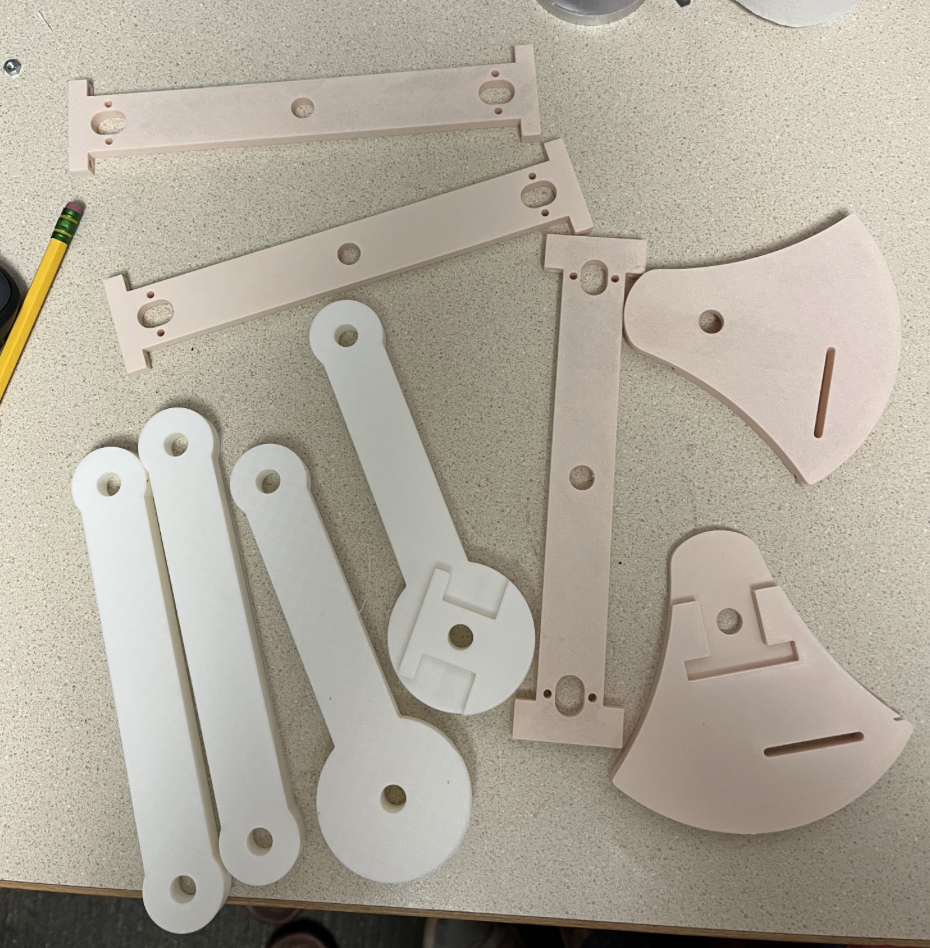
This week, we fabricated and assembled the mechanical components of our vertical 2-degree-of-freedom pantograph. This process involved designing and producing the physical structure, including the linkages and support frame, to prepare the system for electronics integration in the next phase.
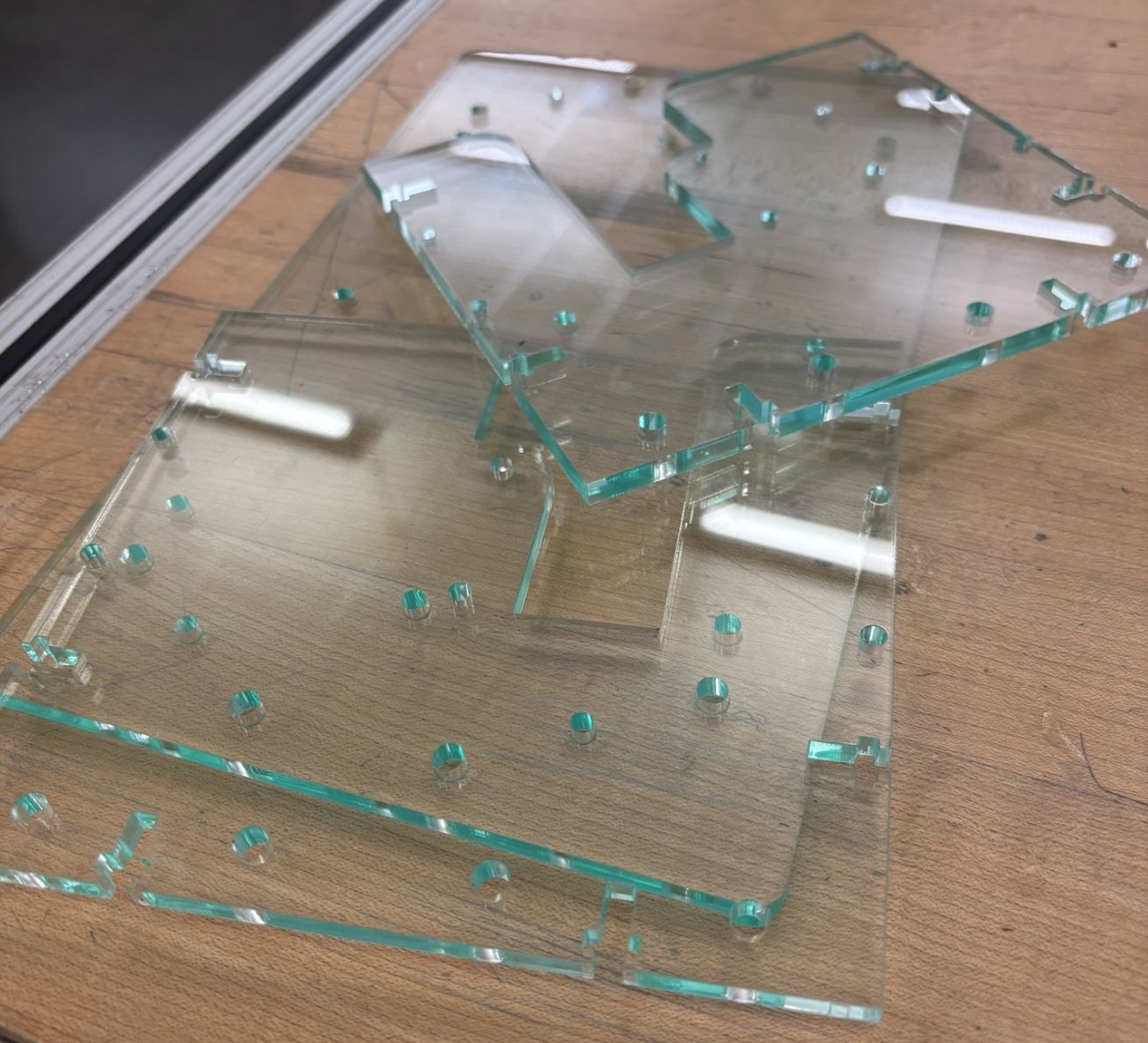
We successfully 3D printed all the custom parts for the pantograph arms and joints and laser cut the acrylic frame. The mechanical assembly was completed on the same day, ensuring that the system was fully constructed and ready for testing ahead of our team meeting.
The pantograph design was inspired by the Campion et al. paper, "The Pantograph Mk-II: A Haptic Instrument," which was shared by Professor Okamura. Their design emphasized principles such as low inertia, high stiffness, and planar kinematics—all of which informed our own 5-bar linkage geometry. We adapted these ideas to support a vertical configuration and tailored the design to fit the hardware available to us, including our motors and encoder mounts.
The CAD model and DXF files for the frame components were generated in Fusion 360 for laser cutting. With the laser cutting and assembly finalized, we are ready to move on to the next critical stage: electronics integration. This includes wiring the two Hapkit boards, establishing leader-follower encoder communication, and programming the Arduino for accurate position tracking and force rendering.
Overall, we remained on track to meet our timeline. Completing the 3D printed components provided a solid foundation, and we aimed to have a fully assembled pantograph ready for testing and software integration by the end of the week.
LaserCutPlates
LaserCutPlates
Checkpoint 2
For Checkpoint 2, we completed the Processing code graphics for our Big Game themed maze. This included creating the bounds of the maze, coding 'axes' for the user to collect, and creating Oski Bear obstacles, which will be their own haptic effect. We currently have the player's cursor controlled by a keyboard, so though our checkpoint was to completely finish the Processing code, we will have to update it to be compatible with our pantograph, which we are completing this Thursday. We still are considering adding more to the game experience through background audio and sound effects, as well as a starting screen to explain the game's objective.
Maze