

2025-Group 1
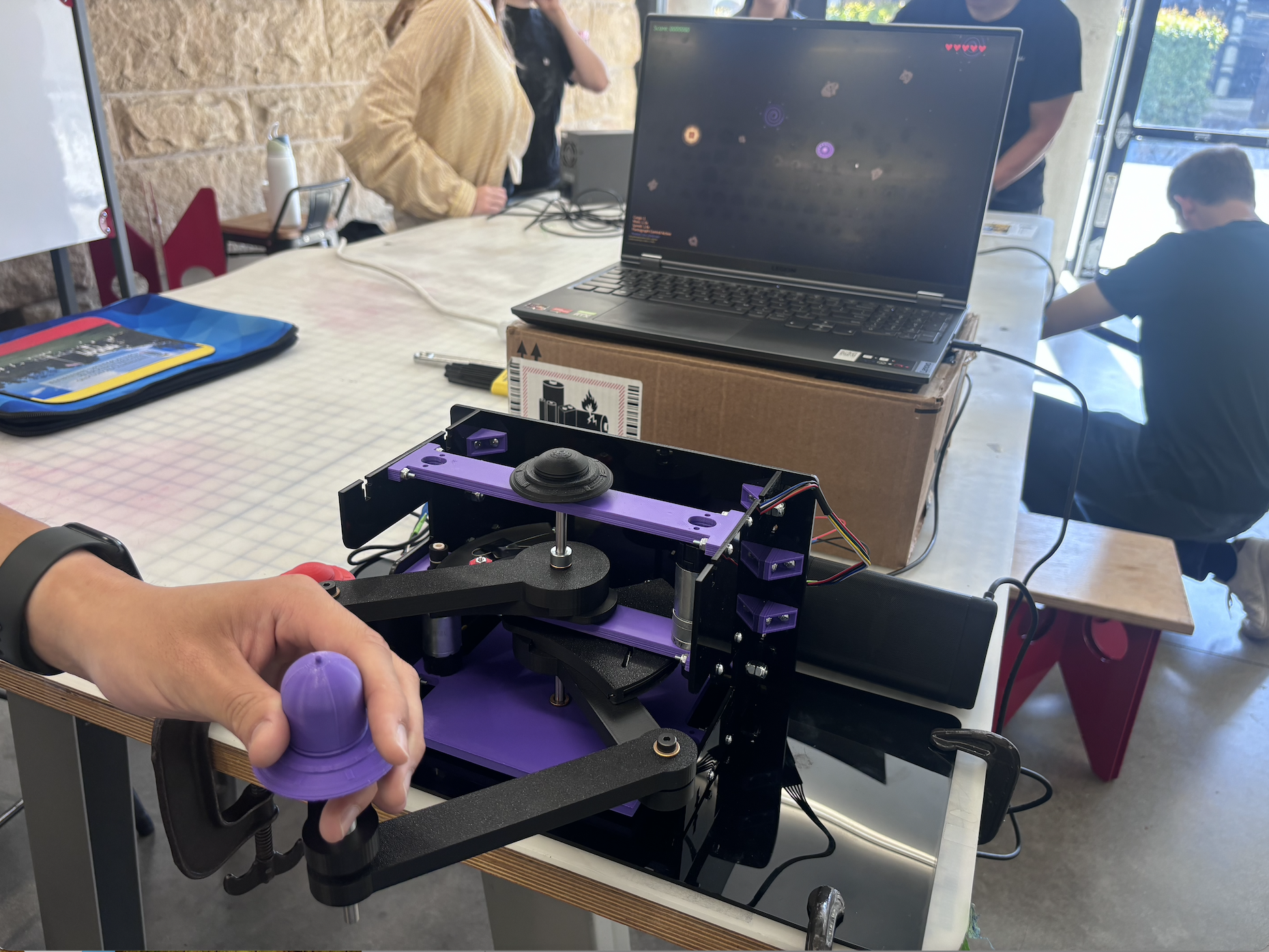
Device in use at Open House.
AstroTouch: Haptic Enhanced Asteroid Game
Project team members: Manuel Abitia, Nick Agathangelou, Jorge Garcia, Giuse Pham
AstroTouch is a haptics computer game that explores the role of force feedback to enhance user interaction within virtual environments. We were motivated to apply core concepts from haptic systems, such as virtual walls, mass-damper systems, and dynamic feedback control. Our main goal was to design a 2D space navigation game where players control a UFO via a pantograph haptic interface. As players avoid asteroids, collect cargo, and navigate gravitational pulls from black holes, they receive real-time haptic sensations that simulate inertia, and collisions. The implementation involved CAD modeling and electronics integration to game logic and UI development in Processing language. For this, we focused on enhancing the overall experience by designing a high-quality controller and user interface, complete with graphics and sound effects. Ultimately, we showcased our system at the ME 327 Open House, where users responded positively, highlighting both the system’s quality and the fun they had while playing.

On this page... (hide)
- Introduction
- Background
- Methods
- Results
- Future Work
- Acknowledgments
- Files
- References
- Appendix: Project Checkpoints
- Goals
- 3D CAD
- ELECTRONICS SCHEMATICS
- Prototype Demonstration
- Goals
- 3D CAD
- NEW PROTOTYPE DESIGN
- PROCESSING CODE DEVELOPMENT
- ARDUINO FOLLOWER CODE
- ARDUINO LEADER CODE
- COMMUNICATION TESTING BETWEEN TWO MOTORS AND PROCESSING
Introduction
We created a game inspired by the 1980s Asteroids game as we could apply theoretical concepts of haptics, such as virtual mass-damper systems, force rendering, and kinesthetic feedback in a dynamic, interactive environment. Our motivation for the project was to design a haptics-controlled asteroid game, where we create a platform to explore how users perceive force feedback in real-time while responding to multiple stimuli, such as collisions, gravitational pulls, and inertia changes. This hands-on implementation reinforces key learning outcomes related to system modeling, control strategies, and user-centered design. The pantograph haptic device is particularly well-suited for this application because it enables 2-DOF in both motion and force feedback, allowing us to realistically simulate interactions like impacts and resistance. Its mechanical simplicity and responsiveness make it ideal for developing an intuitive interface that visually and physically maps user input to in-game actions, enhancing the overall understanding of haptic system behavior.
Background
Haptic Devices
Haptic interfaces for force feedback are typically designed to maximize transparency and fidelity, which demands certain key hardware traits. In general, high-performance devices feature low moving inertia, minimal friction, high structural stiffness, and nearly no backlash, while remaining highly backdrivable [1]. These qualities, often achieved via capstan drives, lightweight linkages, or low-friction bearings, allow the device to transmit forces with a wide dynamic bandwidth without the mechanism’s own dynamics interfering with the feedback [1]. For example, the classic PHANToM desktop haptic device achieved convincing touch sensations by emphasizing low mass, low friction, and low backlash in its design (using techniques like capstan cable drives) while maintaining high stiffness and good backdrivability [2]. Parallel kinematic mechanisms are a common choice to meet these design goals: they inherently offer high rigidity and low moving mass, which is why many force-feedback devices use parallel linkages or grounded arm structures [3]. A notable case is the pantograph mechanism, which is a 2-DOF planar parallel linkage that became popular in haptic research for its large workspace and low inertia. The original Pantograph device was introduced in the mid-1990s as a planar haptic interface with an unusually large working area for human-computer interaction [4]. A decade later, it was re-engineered as the “Pantograph Mk-II,” an open-architecture system built from off-the-shelf components and optimized for dynamic performance [4]. This redesigned pantograph demonstrated impressive capabilities, being able to output finely controlled forces up to 400 Hz bandwidth and resolve motion displacements on the order of 10 µm [5]. Its planar five-bar linkage, driven by base-mounted lightweight motors, exemplifies how low inertia and high stiffness enable crisp force feedback. Many other haptic devices used in gaming or teleoperation follow similar principles. For instance, the Novint Falcon (a 3-DOF consumer haptic game controller) employs a parallel linkage with three grounded motors and updates force output at 1 kHz, allowing users to feel virtual object collisions and weight in video games [6]. Likewise, professional teleoperation master devices are characterized by low apparent inertia and damping, high stiffness, and minimal backlash to faithfully relay forces from remote or virtual environments [7].
Haptic Rendering
Haptic rendering refers to the software algorithms and techniques that simulate tactile and force sensations in response to user actions in a virtual environment. A fundamental challenge is computing appropriate reaction forces when the user’s virtual avatar or cursor contacts objects. A well-known solution is the proxy method, which introduces an imaginary proxy that always remains on the surface of virtual obstacles [8]. As the user moves the haptic handle, the algorithm finds the closest point on the object’s surface and virtually connects the handle to this point with a spring. The force generated by this virtual spring is what the user feels, effectively enforcing the contact constraint [8]. Using such methods, even a simple point-based 2D/3D haptic interface can render the sensation of hard edges and walls. To improve realism, researchers have introduced enhancements like force shading being analogous to shading in computer graphics, which smooths out force vectors across polygonal surfaces [9]. Force shading can make edges and corners feel less “jagged” by interpolating surface normals for force calculations, thereby creating more continuous tactile feedback than a raw geometric model would produce [9].
Beyond static contacts, haptic rendering engines also simulate dynamic properties such as friction, compliance, and inertia. For example, friction can be modeled by adding lateral forces opposing the user’s motion when an object is in contact, and compliance is rendered by allowing slight penetration with spring-damper forces. In games or simulations, virtual mass and inertia are commonly rendered by resisting the user’s accelerations, where the device applies a force proportional to the virtual object’s mass*acceleration, making the object or cursor feel heavy and sluggish when its mass is high. Modern haptic devices are capable of these effects: the Novint Falcon, for instance, can simulate an object’s weight and momentum so that users feel inertia and even recoil or centrifugal forces during gameplay [6].
Not all haptic rendering aims for literal physical accuracy since often the goal is to produce a believable and engaging sensation under hardware constraints. Designers have found creative ways to simplify or amplify feedback to enhance user experience, especially on low-cost systems. One approach is through pseudo-haptic feedback, where visual or control alterations trick the user’s mind into feeling a certain way. For example, if a game wants to convey that the user is getting “heavier” without a strong force-feedback motor, the software can subtly scale the control-to-display ratio so that the on-screen motion is slower relative to hand movement, which the user perceives this added effort as increased weight. Such pseudo-haptic techniques have been shown to induce convincing weight or friction illusions without any change in the actual force output [10]. Another simplification is to use vibrotactile cues in lieu of complex force vectors. For instance, Kim and Hyun’s HAPmini device provides a “magnetic snap” sensation to guide the user’s pointer and uses small vibrations to mimic surface textures [11]. Despite the simplicity of having only one motor, these cleverly designed feedback patterns were sufficient to guide users and make the on-screen interactions feel tactile.
Methods
Hardware Design and Implementation
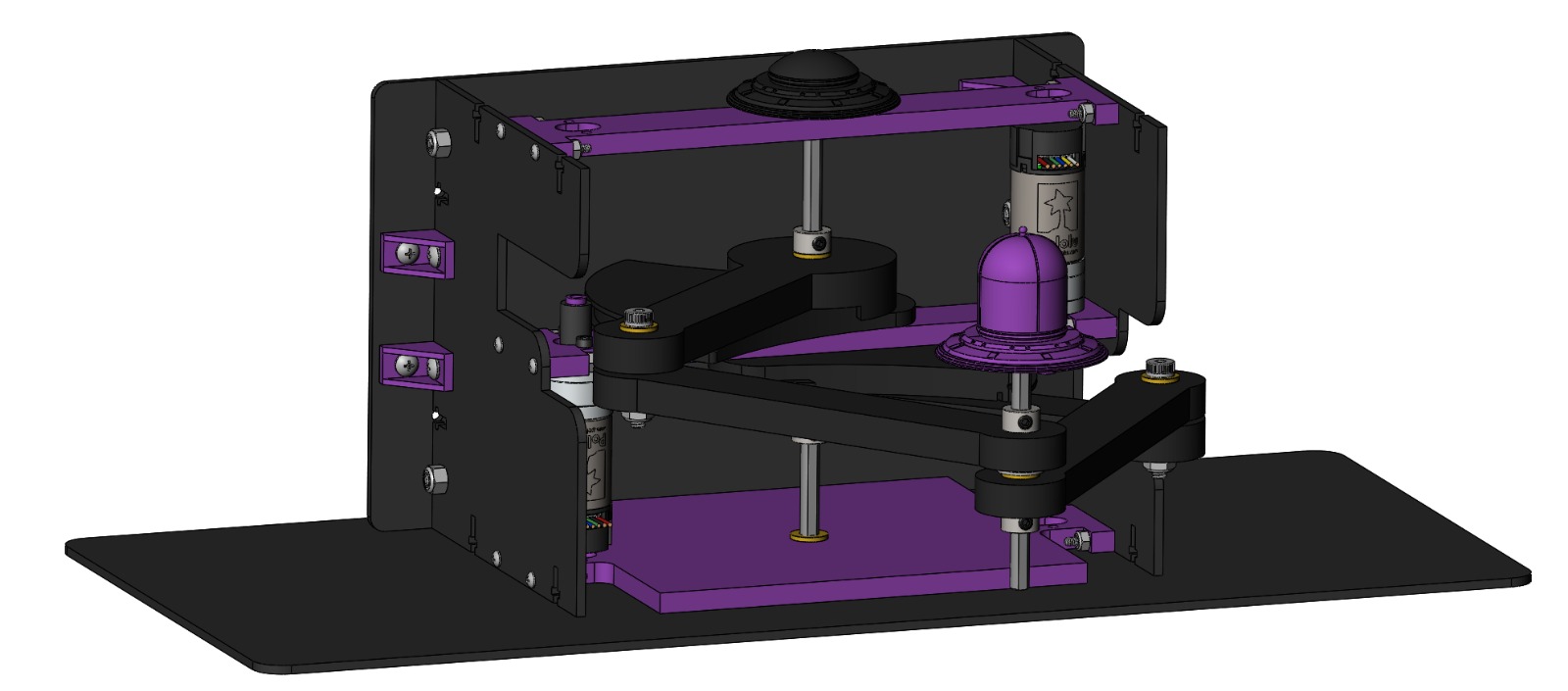
Final Project CAD Model.

Final Project Hardware Design.
Our haptic interface is a vertically-mounted 5-bar pantograph mechanism designed to provide 2-DOF force feedback for a haptically-enhanced asteroid game. The mechanical structure and design inspiration were based on the work of a previous ME 327 team 2024-Group1, who developed a high-stiffness, smooth-operating pantograph using Hapkit components and parallel links. We adapted and modified their layout to suit our vertical configuration and specific gameplay goals.
To meet the mechanical demands of fast, responsive interactions during gameplay, we redesigned the frame and arm layout for vertical operation and increased durability. The arms of our pantograph are 3D printed in PLA and supported with d-shafts and brass bushings to ensure smooth rotation and minimal backlash. The arms are fixed using shaft collars to avoid axial play. The rotation axes of the two driven links are anchored in the side walls of the frame and reinforced with purple cross-members. These cross-members play a crucial role in limiting out-of-plane bending, which becomes especially important in a vertical orientation where the end-effector is no longer stabilized by a flat surface.
One of the key design upgrades was the use of two Pololu motors with integrated encoders (https://www.pololu.com/product/4881) to improve angular position tracking and force rendering fidelity. These motors offered high-resolution encoder feedback directly coupled to the capstan shaft, enabling precise tracking of user input and reliable rendering of virtual forces. We designed custom shaft adapters to securely couple the motor shaft to the capstan pulley, and we incorporated mounting brackets into the vertical structure for clean alignment and easy integration.
Due to the requirement of two interrupt pins per encoder and the limitations of available interrupt support per microcontroller, we adopted a distributed architecture using three Arduino boards. One board functions as the Leader, responsible for rendering forces and managing communication with the game environment. The other two boards act as Followers, each dedicated to reading encoder counts from a single motor. These Followers transmit encoder data to the Leader using the I²C protocol, ensuring synchronized position tracking across both joints of the pantograph. The Leader polls each Follower periodically to collect updated angle data, then computes joint states and applies appropriate force feedback in real time. This modular architecture improved reliability and timing accuracy while enabling scalable encoder integration without overloading any single board.
To further improve the mechanical robustness of the system, we redesigned the laser-cut acrylic side walls and added L-brackets for additional rigidity at the joints. We also modified the base to include an extended bottom surface that allows the device to be securely fixed to a tabletop using Velcro, which is an essential addition for gameplay stability. All 3D-printed parts were printed in black or purple PLA to match our aesthetic theme, and our assembly uses mostly standard Hapkit hardware and screws to minimize cost.

Final Electronics Schematic.
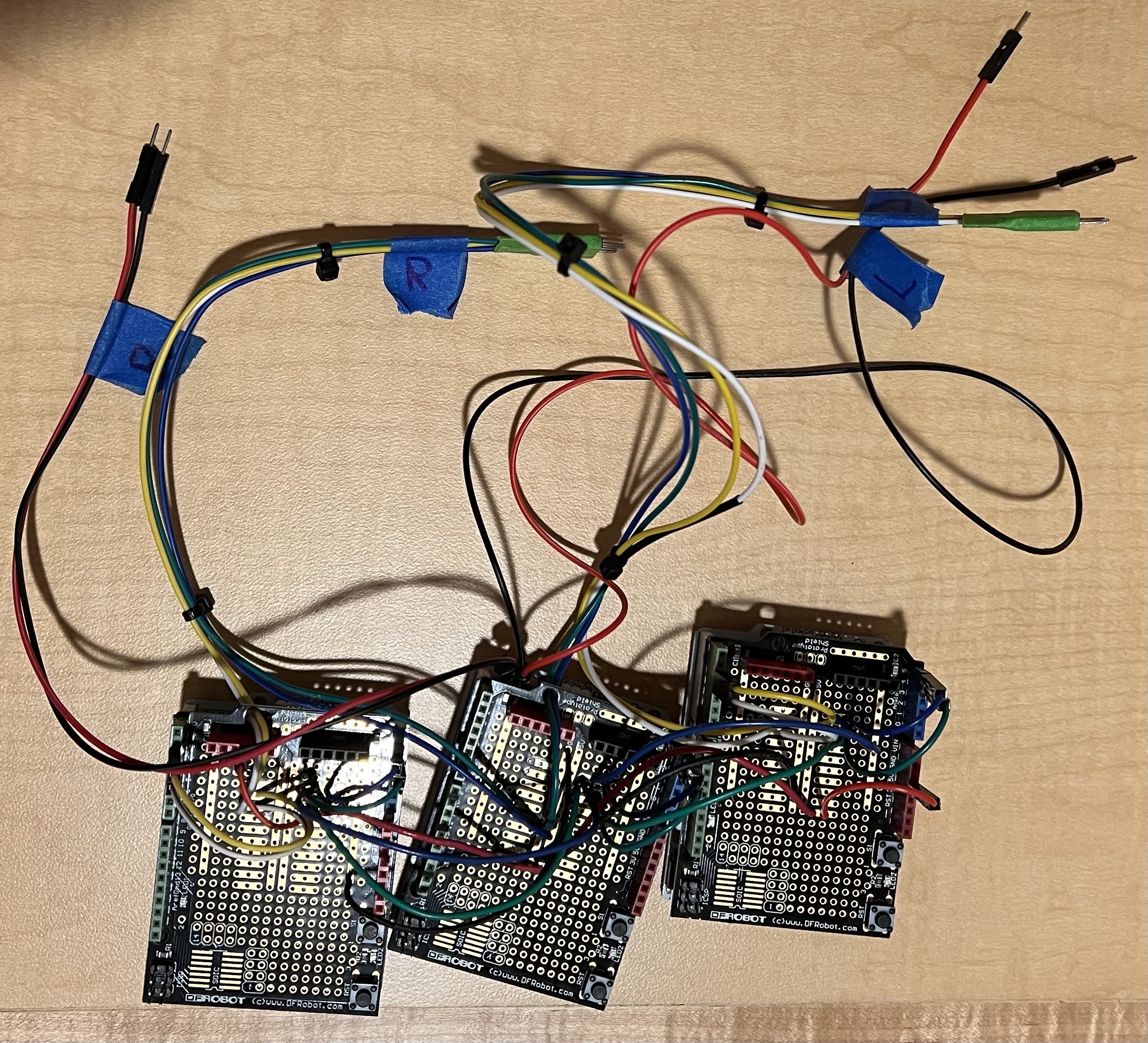
Final Electronics Soldering Work.
Because we were using motors with encoders, using the I2C pins on the Hapkit board was advantageous to minimize wiring and efficiently communicate encoder data on the SDA and SCL channels. As shown above, the motors were connected to a system of three Hapkit boards. The middle Hapkit board is responsible for powering the entire system through an external power supply and communicating the information through the Serial monitor. The other two Hapkit boards use the Follower code to collect and transmit motor encoder information back and forth as the Arduino side receives torque commands. To improve the robustness of our electronics, it was deemed best to use a pinned protoboard and soldered wires.
System Analysis and Control
The kinematics of our pantograph system were implemented by leveraging motor angle measurements obtained from the encoders on each joint. These measurements were used to calculate the Cartesian position of the end-effector using the forward kinematic equations reported by Campion, Wang, and Hayward [12], as shown below:

Forces were then rendered using the transpose of the Jacobian matrix, as illustrated in this image. The Jacobian relates task-space forces to joint torques, enabling the pantograph to produce accurate haptic feedback in response to collisions, gravity, and other game forces.

The partial derivatives needed to construct the Jacobian were computed using the expressions shown here, also derived from the work of Campion, Wang, and Hayward [12]. These expressions capture how the geometry of the system changes with respect to joint angles and are essential for real-time force computation.

Math and Dynamics
To evaluate the haptic feedback and control logic of our asteroid-themed game, we performed a full dynamics study on the force renderings in the virtual environment. The system includes four key haptic obstacles: cargo pickups, black hole vortex, asteroids collisions, and walls. All obstacles were implemented in the Processing environment and rendered using real-time motor angle feedback from the pantograph. The haptic forces were computed in Arduino and sent as feedback to the user.
Wall:
Walls were implemented to create physical boundaries in the game environment. When the user attempts to push through the wall boundary, a restoring force is rendered to prevent motion past the edge. This force is calculated using Hooke’s law:

This spring-like force increases the deeper the player pushes into the wall, providing a clear haptic boundary.
Black Hole:
The black hole exerts an attractive force that increases as the user gets closer to its center. The force follows an inverse-square law, capped at a maximum for safety and comfort. This is given by:
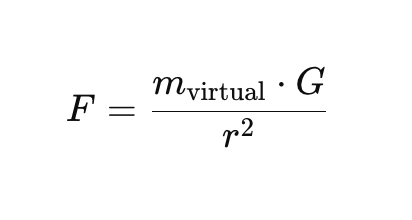
The force is directed toward the black hole’s center and scaled based on collected cargo.
Cargo:
Each cargo collected increases the player’s virtual mass, simulating higher inertia. This influences the black hole force and movement damping. This is shown below:

As mass increases, gravitational attraction becomes stronger and motion becomes heavier, giving a realistic feel of carrying load.
Asteroid Collisions:
When the UFO collides with an asteroid, a fixed impact force is applied in the opposite direction to simulate a reactive kickback. This is expressed in the following equation:

Asteroid collisions are rendered by applying a short, sharp force impulse directed away from the point of impact. The force magnitude depends on asteroid size and is scaled to Newtons, then mapped to the pantograph’s real-world workspace. This simulates a realistic push-back sensation during impact.
Demonstration
For our final demonstration, we are including a video that explains the main features of our haptic game
and showcases how the user interacts with the system in real time. 
Final game in use
The video highlights the force feedback mechanisms, such as gravitational attraction from the black hole, collisions with asteroids, cargo inertia effects, and boundary constraints from the virtual walls, while walking through the different game elements the player encounters. To enhance the visual experience, we used Claude AI to assist in generating and refining the game's graphics, which were implemented in Processing. This collaboration between AI-assisted design and interactive rendering allowed us to build a more immersive and polished game environment that complements the physical sensations delivered by the haptic device.
A video showing the use of our device during the final demonstration is located here: https://youtu.be/tRRI_UVFoh8
Results
At the open house, at least 17 participants tried out the device. Below is a concise description of the quantitative and qualitative results:
% %
% %
%
Nearly 90% of participants found the force feedback from “hitting” the invisible walls (the bounding box) to be Good or Excellent. About 76% of users rated the haptic “pushback” from asteroids as Good or Excellent. An overwhelming majority (88.3%) rated the “sucking‐in” force of the black holes as Good or Excellent, with 76.5% choosing Excellent specifically.
% %
% %
%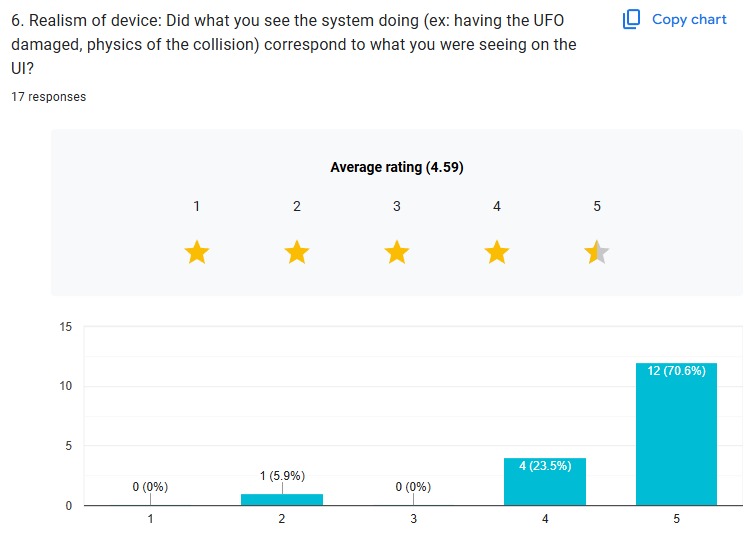
Nearly 70% of participants gave a score of 4 or 5 when asked how intuitive it was to steer the UFO. This is understandable, as it might be the first time for the users to try the device. Over 80% of participants rated the steering sensitivity as either 4 or 5, meaning they felt the system responded well to their inputs without being too sluggish. Fully 94% of participants rated the overall realism of collisions and on-screen physics as either 4 or 5.
% %
% %
%
Scores varied widely (from under 200 points up to nearly 5,000). All qualitative comments were uniformly positive.
After the Open House, our leaderboard showcased the top five scorers based on gameplay performance:

AstroTouch Leaderboard after Open House.

Zach5 1st Place of the Open House AstroTouch Activity.
ZACH5 (Zach Sutherland from 2025-Group18) secured first place with an impressive 5843 points, followed by SAIMAI (Saimai Lau from 2025-Group17) in second place with 4735, and ELVY (Elvy Yao from 2025-Group11) in third with 4079. This activity demonstrated consistent engagement across multiple players. The leaderboard added a competitive and arcade-like element to the experience, encouraging players to replay and improve their performance.
Future Work
While our system achieved its foundational goals, such as rendering force feedback for gravitational attraction, collisions, and wall constraints, there remain several opportunities for refinement and expansion. To evaluate its effectiveness, we conducted user surveys after gameplay sessions, which provided valuable feedback on the intuitiveness of the controls, the clarity of force sensations, and the overall enjoyment of the game. This informal user testing helped us identify both strengths like the satisfying pull of the black hole and the tactile feedback during cargo collection, and areas for improvement, such as occasional instability in wall collisions. Based on this feedback, future improvements could include refining the force rendering algorithms to make transitions between regions smoother and more consistent, as well as enhancing the responsiveness of the interface by optimizing loop timing and filtering methods.
To deepen immersion and encourage replayability, we envision introducing adaptive challenges—such as asteroids that follow player motion or black holes that grow stronger over time. The cargo mechanic could also evolve to include different materials or weights, requiring varied handling strategies. On the visual side, the game could benefit from more informative and dynamic feedback, such as UI elements that flash or change color based on force intensity, or animations that react to collisions and pickups. These upgrades would not only make the game more engaging but also help reinforce the connection between visual cues and haptic sensations.
Hardware-wise, we aim to increase the structural stability of the setup by securing internal components more permanently and designing a more intuitive and comfortable user handle. Sensor drift or position inaccuracies observed during prolonged use could be mitigated through improved cable tensioning mechanisms or by switching to non-slip rotary encoders. Implementing exponential decay for some forces or adjusting force onset thresholds may also lead to more natural-feeling interactions.
Acknowledgments
We would like to extend our sincere thanks Professor Allison Okamura for her mentorship, and teaching assistants Teo Ren and Ryan Nguyen for their continuous technical support and guidance throughout the development of our project.
We would also like to thank to the groups Haptic Air Hockey Simulation Device from 2023: Max Ahlquist, Dani Algazi, Luke Artzt, and Ryan Nguyen (2023-Group1) and Haptic Kong group from 2024: Courtney Anderson, Mason Llewellyn, Trevor Perey, and Kameron Robinson (2024-Group1) for sharing their documentation and design inspiration, which greatly informed our pantograph construction.
Files
The Arduino Leader code is included in the following ZIP file: Attach:LeaderCode_ME327_Team1Spring2025.zip
The Processing code is included in the following ZIP file: Attach:Processing_Code_ME327_Team1Spring2025.zip
The Arduino Follower code is included in the following ZIP file: Attach:FollowerCode_ME327_Team1Spring2025.zip
The CAD assembly files are included in the following ZIP file: Attach:Final_Full_Assembly_2025.zip
The Bill of Materials is included in the following ZIP file: Attach:Bill_of_Materials_Sheet_Team1Spring2025.zip
The full demo video is included in the following YouTube link: https://youtu.be/tRRI_UVFoh8
References
[1] M. C. Cavusoglu, D. Feygin, and F. Tendick, “Design of a General Purpose 2D Haptic Interface,” IEEE Transactions on Robotics and Automation, vol. 18, no. 1, pp. 108–113, 2002. https://ieeexplore.ieee.org/document/983852
[2] T. Massie and J. Salisbury, “The PHANToM haptic interface: A device for probing virtual objects,” ASME Winter Annual Meeting, Chicago, IL, 1994.
[3] B. Hannaford and A. M. Okamura, “Haptics,” in Springer Handbook of Robotics, Springer, 2008, pp. 719–739. https://link.springer.com/referenceworkentry/10.1007/978-3-319-32552-1_29
[4] V. Hayward and O. Astley, “Performance Measures for Haptic Interfaces,” in Robotics Research, Springer, 1996, pp. 195–207. https://link.springer.com/chapter/10.1007/3-540-61679-0_20
[5] P. Berkelman and R. Hollis, “Design of a High-Performance Haptic Interface,” IEEE International Conference on Robotics and Automation, 1999. https://ieeexplore.ieee.org/document/770050
[6] Novint Technologies Inc., “Novint Falcon: A Haptic Controller for Games and Simulations,” 2007. https://web.archive.org/web/20080224020656/http://home.novint.com/products/novint_falcon.php
[7] Force Dimension, “Omega Series – High Precision Haptic Devices.” https://www.forcedimension.com/products/omega
[8] C. Zilles and J. Salisbury, “A Constraint-Based God-Object Method for Haptic Display,” Proceedings of IEEE International Conference on Robotics and Automation (ICRA), 1995. https://ieeexplore.ieee.org/document/525878
[9] M. Salisbury and C. Tarr, “Haptic Rendering of Contact: Force Shading and Surface Details,” Eurohaptics, 2000.
[10] L. Dominjon, A. Lecuyer, J. M. Burkhardt, P. Richard, and S. Richir, “The ‘Pseudo-Haptic’ Feedback: Can Isometric Input Devices Simulate Force Feedback?” IEEE Virtual Reality, 2005. https://ieeexplore.ieee.org/document/1390892
[11] J. Kim and J. Hyun, “HAPmini: One-Handed Haptic Interaction Device for Mobile Touch-Screen Devices,” ACM Conference on Human Factors in Computing Systems (CHI), 2016. https://dl.acm.org/doi/10.1145/2858036.2858470
[12] G. Campion, Q. Wang, and V. Hayward, “The Pantograph Mk-II: A Haptic Instrument,” Proceedings of IEEE/RSJ International Conference on Intelligent Robots and Systems (IROS), 2005. https://ieeexplore.ieee.org/document/1545213
Appendix: Project Checkpoints
Checkpoint 1
Goals
Initially, our focus was on developing the software component of the project. However, we have decided to prioritize hardware development first, as this will allow us to test multiple design iterations and identify the most efficient configuration for our application. For this checkpoint, we are focusing on the CAD design of the 2-DOF pantograph mechanism and beginning the initial construction of the hardware prototype. Simultaneously with the mechanical design, we are also developing the circuit schematics needed for motor control and sensing, ensuring stable and responsive actuator behavior during gameplay.
3D CAD
For Checkpoint 1, we focused on designing a 2-DOF pantograph mechanism to serve as the core of our haptic interface. Using SolidWorks and the GraphKit, we created a detailed CAD model that captures the kinematic structure and physical constraints of the system. This design ensures smooth planar motion and will allow us to implement force feedback in both the X and Y directions.
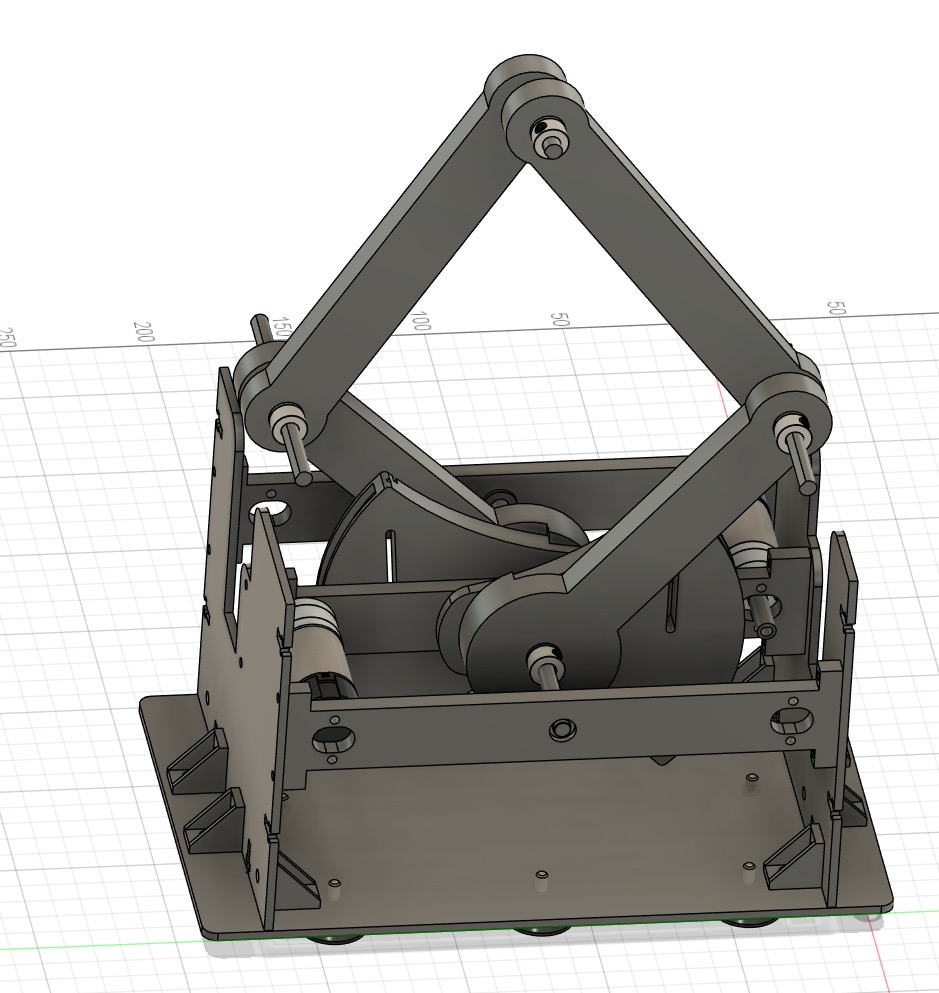
The CAD files for the mechanism are included in the attached ZIP folder and will serve as the foundation for the physical assembly and future iterations. Attach:Checkpoint1_Assembly_Team1_Spring2025.zip
ELECTRONICS SCHEMATICS
For the electronics, we opted to use the motors with encoders, similar to what the previous year's team 1 used. That way, we could solve the issue of the motor readings skipping due to the motor and magnet reading from the Hapkit's magnetic resistive sensor. The encoders allow us to read and write motor values through the Hapkit's digital and PWM pins. The motors were ordered today from Pololu.

Prototype Demonstration
As part of this checkpoint, we have also recorded a prototype demonstration video showcasing the current state of our hardware development. The video highlights the assembled 2-DOF pantograph mechanism and its range of motion, giving a clear view of the physical design and how it will interface with the user's input. The prototype was built using 3D-printed components and laser-cut acrylic parts, allowing us to quickly fabricate and assemble the mechanism for initial testing. This early prototype allows us to validate the mechanical structure, test joint movement, and begin planning for motor integration and sensor placement. The demonstration serves as a foundation for further iterations and offers a tangible step toward full system integration.

You can find this demonstration video at the following link: Attach:Prototype_Demonstration_Team1_Spring2025.MOV
Checkpoint 2
Goals
For Checkpoint 2, we completed a fully functional hardware prototype of the 2-DOF pantograph, improving upon the initial version with better alignment, increased stability, and smoother motion. These changes made the device more reliable and ready for integration. We also made significant progress on the software side, developing the core game environment in Processing. This included implementing spaceship movement, asteroid collisions, cargo collection, black hole interactions, and a visual user interface which is currently controlled with mouse input as a placeholder for the pantograph. In parallel, we began writing the Arduino code for the follower mechanism, which will allow real-time haptic feedback based on in-game events.
3D CAD
As part of our progress, we made several key improvements to our 3D CAD design. The updated model, shown in the figure, features a more compact and robust frame, enhanced arm alignment, and cleaner mounting interfaces that simplify assembly and increase structural integrity. These refinements allowed for smoother mechanical motion and easier integration of the motors and sensors. Additionally, we decided to upgrade our actuation system by using motors with integrated encoders (https://www.pololu.com/product/4881). We chose these motors because they provide more accurate and reliable tracking of the capstan’s rotation, which is critical for precise haptic rendering and closed-loop control. The built-in encoders simplify the design by reducing wiring complexity and improving feedback resolution, which will allow us to better simulate dynamic forces and virtual environments in the final system.

The CAD files for the mechanism are included in the attached ZIP folder and will serve as the foundation for the physical assembly and future iterations. Attach:Updated_Pantograph_Assembly_Team1_Spring2025.zip
NEW PROTOTYPE DESIGN
This new prototype represents a major improvement over the initial Checkpoint 1 design, both in functionality and mechanical integration. One key update is the redesigned base, which now includes a flat, extended platform that allows the system to be securely attached to a surface using Velcro or adhesive strips. This ensures greater stability during operation, especially when force feedback is applied. Another major upgrade is the integration of two motors with built-in encoders one for the Arduino leader and another one for the Arduino follower. These motors enable precise tracking and real-time control of both ends of the pantograph, allowing us to capture user input and apply haptic forces with accuracy. To accommodate them, we designed custom shaft adapters that couple the motor shafts to the capstan mechanism. These adapters ensure tight, reliable connections and smooth torque transmission. The motors were mounted vertically into the frame, fitting cleanly into dedicated cutouts that support both alignment and cable routing. Additionally, we replaced the regular nuts from the previous prototype with locking nuts to improve structural stability and prevent loosening during operation.

PROCESSING CODE DEVELOPMENT
We worked during the last week on developing Processing code to implement the core gameplay and visual interface for the Haptic Asteroid Game. We designed a 2D space environment where the player controls a spaceship, currently using mouse input as a stand-in for the pantograph’s haptic input. The game includes dynamic features such as falling asteroids, collectible cargo crates that increase the spaceship virtual mass, and a black hole that exerts a simulated gravitational pull. These interactions are governed by basic physics, including mass, damping, and force, which we structured to support real-time feedback through the haptic system. As cargo is collected, the increased mass makes the spaceship harder to control, introducing a strategic challenge for the player. We also implemented collision detection, score tracking, explosion particle effects, and a user interface that displays score, lives, cargo count, and the current mass multiplier. This Processing sketch represents the visual and interactive foundation of our project and is fully prepared to integrate with our Arduino-based pantograph system, allowing for future implementation of bidirectional communication and force feedback.

You can find the Processing code attached here: Attach:Astrotouch_Game_Team1_Spring2025.zip. This file contains the full implementation of the game’s visuals, physics, and gameplay logic, developed as the foundation for integrating haptic interaction.
ARDUINO FOLLOWER CODE
We also worked on developing the Arduino follower code to control the follower motor in the haptic pantograph system. Its primary function is to read real-time position data from the motor's built-in encoder and adjust the motor output to follow a target position. This target position is expected to be received from the leader device or a central controller. The code uses a basic proportional control loop to minimize the error between the current and desired positions, allowing the follower motor to smoothly and accurately track movements. By integrating the encoder readings and motor output, this code forms the foundation for implementing leader-follower synchronization, which is essential for creating coordinated motion in haptic interactions. The structure of the code is kept clean and modular to allow for easy future upgrades, such as adding derivative or integral terms for PID control or handling more complex force feedback behavior.
You can find the follower Arduino code attached here: Attach:Arduino_Follower_Team1_Spring2025.zip
ARDUINO LEADER CODE
Moreover, we developed a leader Arduino code in our haptic pantograph system. It reads high-resolution position data from the motor’s integrated encoder and transmits this data over serial communication to the follower device. This allows the follower motor to mirror the leader’s movement in real time, enabling accurate tracking and coordination between both ends of the pantograph. The code is designed to run efficiently by using encoder interrupts for precise motion tracking and sending position updates at a consistent rate. It forms the foundation for closed-loop haptic interaction and is structured to support future enhancements, such as force computation or bidirectional communication with the game interface in Processing. This master code is essential for capturing user input and enabling responsive haptic control.
You can find the follower Arduino code attached here: Attach:Arduino_Leader_Team1_Spring2025.zip
COMMUNICATION TESTING BETWEEN TWO MOTORS AND PROCESSING
We worked on creating a Processing sketch to test serial communication between the computer and the Arduino devices used in the haptic system. Its primary function is to send and receive data over a serial connection, ensuring that messages are correctly transmitted between the Processing environment and the Arduino boards. This test was useful for verifying that the leader Arduino could send encoder position data and that the follower could respond appropriately. It also helped confirm the correct format and timing of data packets before integrating the full game logic. The sketch serves as a reliable debugging tool for establishing communication protocols and can be reused or expanded for more advanced control and feedback testing.
You can find the motors-Processing communication code attached here: Attach:Communication_Testing_Team1_Spring2025.zip
You can also find a video testing the communication between the two motors and Processing attached here: Attach:Communication_Video_Team1_Spring2025.mov